Managing a growing business is exciting until "Invoice Friday" rolls around. If you’re still manually typing vendor names, tax amounts, and line items into a spreadsheet, you aren't just losing time—you’re risking costly data-entry errors.
In 2026, the secret to scaling operations isn't hiring more data entry clerks; it’s leveraging a bulk invoice extractor. This guide will show you how to automate your accounts payable workflow in minutes using PerfectParser.
What is a Bulk Invoice Extractor?
A bulk invoice extractor is a specialized tool powered by Optical Character Recognition (OCR) and AI. Unlike a standard PDF converter, it doesn't just "read" text; it understands the structure of a document. It knows the difference between a "Total" and a "Subtotal," regardless of whether the invoice comes from a global supplier or a local vendor.
Try PerfectParser Free
Extract data from your first documents today. No credit card required — 30 free credits included.
Start Free →The Problem: The "Manual Entry" Ceiling
Most businesses hit a wall when they reach 50+ invoices per month. Manual processing leads to:
- •Data Fatigue: Errors in decimal points or vendor names.
- •Bottlenecks: Payments get delayed because the "inputter" is sick or busy.
- •Hidden Costs: If you pay an accountant $40/hr to type data, that’s an expensive spreadsheet.
Step-by-Step: Extracting Data with PerfectParser
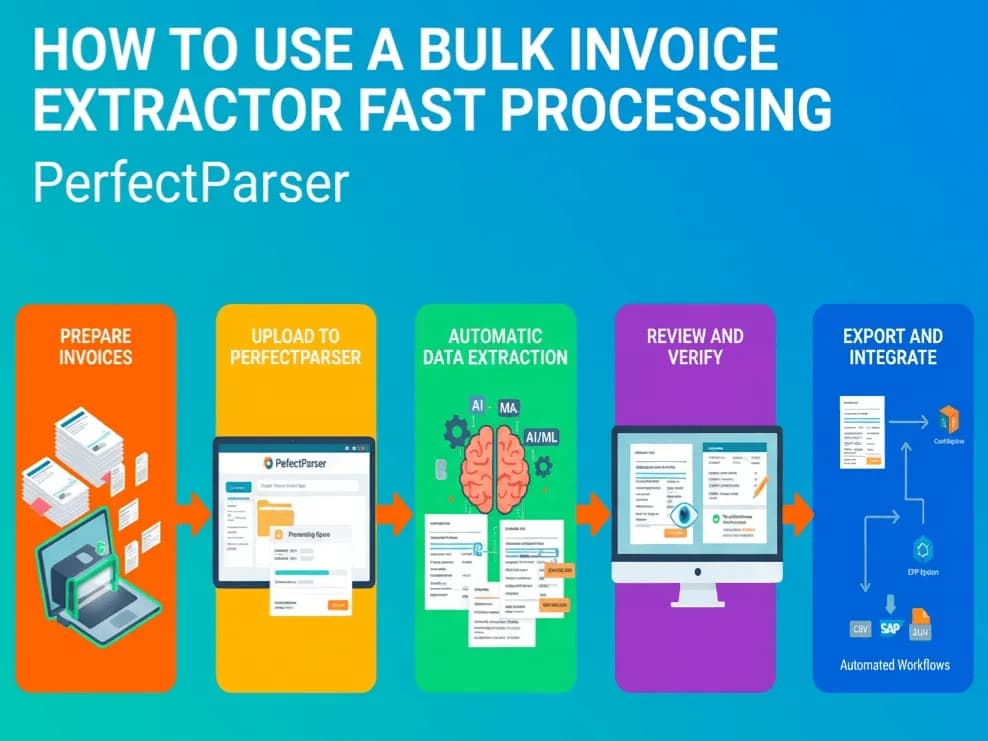
Here is how you can turn a mountain of PDFs into a clean dataset in four simple steps.
1. Upload Your Batch
Gone are the days of uploading one by one. With PerfectParser, you can drag and drop an entire folder of PDF, JPG, or PNG invoices. Our system begins processing the layout of each document immediately.
2. Define Your Fields (The "Set and Forget")
Most users need specific data points. You can tell the extractor exactly what to look for:
- •Invoice ID & Date
- •Vendor Name & Tax ID
- •Line Item Descriptions
- •Total Amount & Currency
3. Review and Verify
Even with 99.9% accuracy, a quick "spot check" is good practice. PerfectParser flags any low-confidence characters (like a blurry "8" that might be a "B") so you can confirm them in a split second without re-reading the whole page.
4. Export to Your Ecosystem
Once the extraction is complete, you can export your data in the format that fits your workflow:
- •Excel/CSV: For the data lovers.
- •JSON: For the developers integrating with custom apps.
- •Direct Integration: Sync directly with QuickBooks, Xero, or your custom ERP.
Why PerfectParser is the Right Choice for Your Workflow
| Feature | Manual Entry | Generic OCR | PerfectParser |
|---|---|---|---|
| Processing Speed | 5 mins / invoice | 30 secs / invoice | < 3 secs / invoice |
| Accuracy | Prone to human error | Struggles with tables | AI-Verified Accuracy |
| Scalability | Hard (requires hiring) | Moderate | Infinite (Batch Uploads) |
| Format Support | N/A | Limited | PDF, Scans, & Photos |
Pro-Tips for Maximum Extraction Accuracy
To get the most out of your bulk invoice extractor, keep these three tips in mind:
- •Avoid "Stacked" PDFs: If possible, upload separate files for separate invoices rather than one giant 500-page PDF containing 500 different vendors.
- •High Resolution Matters: If you are scanning physical mail, aim for at least 300 DPI. The clearer the image, the faster the AI can "read" it.
- •Consistent Naming: While not required for extraction, naming your files consistently (e.g.,
YYYY-MM-DD_VendorName) makes your internal archiving much cleaner.
Ready to Reclaim Your Time?
Stop being a middleman between your invoices and your software. PerfectParser was built to handle the heavy lifting so you can focus on growing your business, not filing its paperwork.
Easily extract data from multiple invoices at once with our bulk invoice extractor. Save time and streamline your invoice processing today.