
Invoice OCR and AI invoice parsing are often used as if they mean the same thing. They don't. OCR reads text. AI parsing understands what that text means. The distinction determines whether your extraction pipeline works on three vendors or three hundred — and whether it breaks every time a supplier changes their invoice design.
This glossary explains both technologies clearly, defines the key terms you'll encounter when evaluating invoice extraction tools, and shows you when to use each.
OCR: What It Actually Does
Optical Character Recognition (OCR) is the technology that converts an image — a scan, a photograph, or a rasterized PDF — into machine-readable text.
When you scan a paper invoice and upload it to software, OCR is the layer that reads the pixels and produces a string of text. Without OCR, a scanned document is just an image: computers cannot search it, extract from it, or process it in any meaningful way.
What OCR Does Well
- •Converts printed text in images to searchable characters
- •Works reliably on clean, high-resolution documents
- •Handles standard fonts and printed layouts well
- •Is fast and computationally inexpensive
Where OCR Breaks Down
OCR's limitation is that it produces raw text — it has no understanding of meaning. It can tell you that the document contains the string $4,250.00 but it cannot tell you whether that number is the invoice total, a line item amount, or a tax figure.
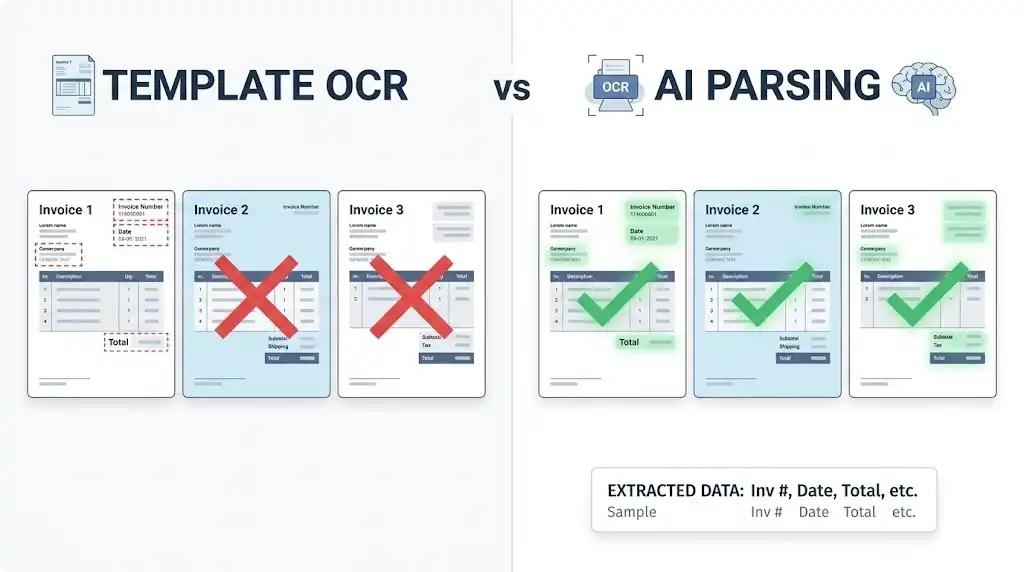
This is where template-based OCR was invented as a workaround: you draw bounding boxes around specific regions of a document (e.g., "the total is always in the bottom-right at these coordinates") and extract from those fixed positions.
Template-based OCR works when every invoice from a given vendor looks identical. It fails the moment a vendor changes their invoice design, switches to a different accounting software, or sends a document with a slightly different layout.
In practice: Hyperscaler OCR APIs (AWS Textract, Google Document AI) achieve 78–93% accuracy on diverse, real-world invoice batches — sufficient for standardized, high-volume single-template processing, but not for mixed-vendor AP workflows.
AI Invoice Parsing: What It Actually Does
AI invoice parsing (also called intelligent document processing or IDP) adds a semantic understanding layer on top of OCR.
Instead of asking "what text is at these coordinates?", AI parsing asks "what does this text mean?" The model reads the full document, understands its structure, and identifies fields by their contextual role — not their position.
A well-trained AI parser can correctly identify Total Amount Due: $4,250.00 as the invoice total whether it appears in the top-left, bottom-right, a sidebar, or after a line-item table — because it understands the relationship between the label and the value.
In early 2026 evaluations, advanced LLM-based parsers (using models like Claude or purpose-built document AI) achieved approximately 99% field-level accuracy on complex, diverse invoice sets — significantly outperforming OCR-only approaches on the same datasets.
Key Capabilities of AI Invoice Parsing
- •Layout-agnostic extraction — works across vendor formats without templates
- •Semantic field identification — finds vendor name, invoice number, totals by meaning, not position
- •Line item extraction — handles variable-length tables with multiple rows
- •Confidence scoring — flags uncertain values for human review
- •Scanned document handling — combines OCR + AI to process paper and image-based invoices
Glossary of Key Terms
Understanding these terms will help you evaluate any invoice extraction tool accurately.
Layout Variance
Layout variance refers to the differences in how invoices are formatted across vendors. Every supplier uses their own accounting software, template, or design convention. This produces invoices that look completely different from each other even though they contain the same logical fields.
Why it matters: Template-based OCR tools assign fixed coordinates to each field. When a new vendor's invoice has a different layout, the template produces incorrect or empty extractions. AI parsing handles layout variance natively because it reads context, not coordinates.
3-Way Matching
3-way matching is an accounts payable control process that compares three documents before approving a payment:
- •Purchase Order (PO) — what was ordered and at what agreed price
- •Goods Receipt — what was actually received and accepted
- •Supplier Invoice — what the vendor is billing you for
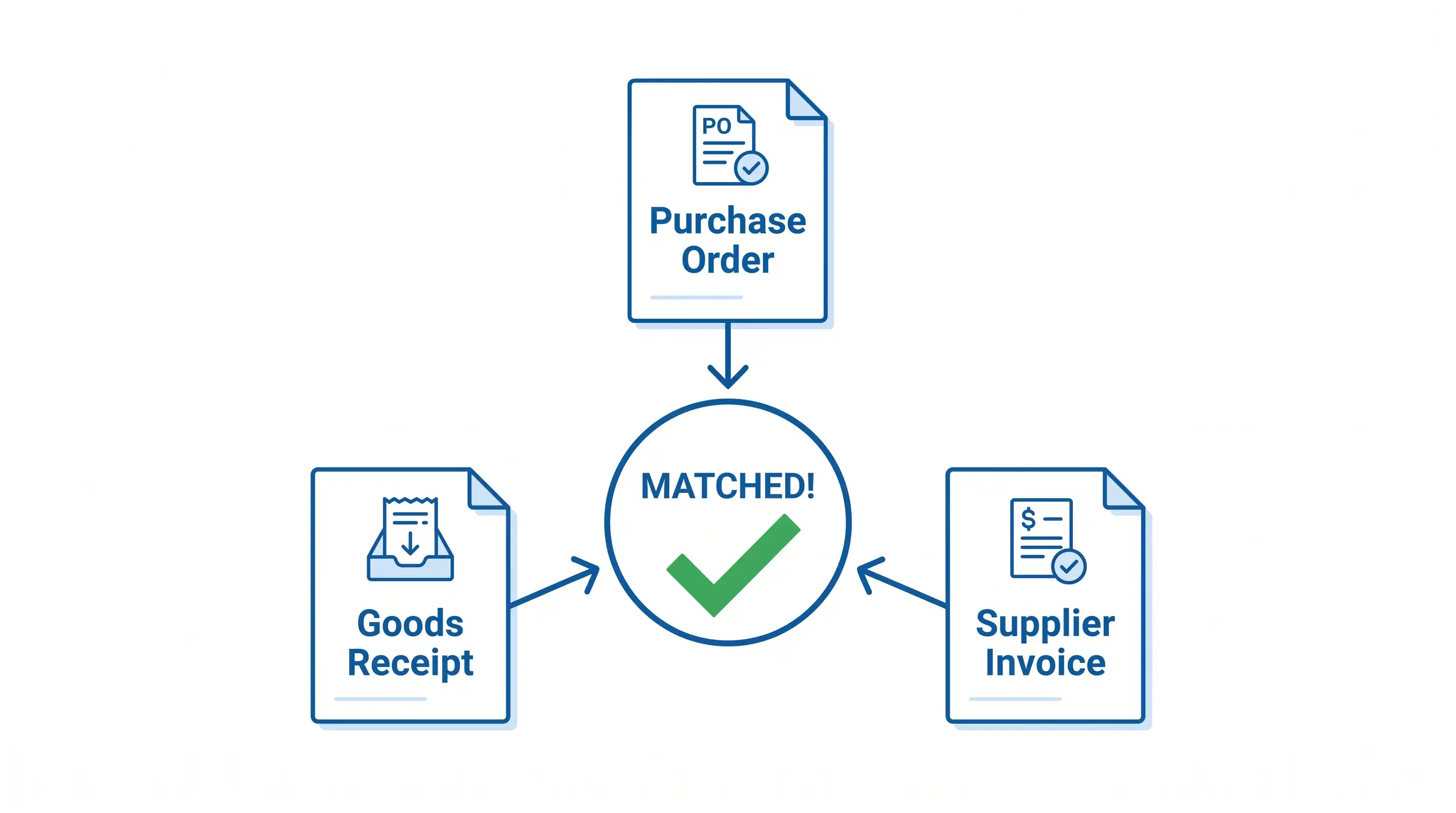
A match across all three documents signals that the transaction is legitimate and accurate. Discrepancies trigger a hold for human review.
Why it matters: Invoice extraction is the prerequisite for automated 3-way matching. The extracted invoice data must be structured and field-accurate to compare reliably against PO and receipt data in your ERP.
Confidence Scoring
Confidence scoring is a quality measure assigned to each extracted value by the AI. It represents how certain the model is that it correctly identified and read a specific field.
A score might look like:
- •
Vendor Name: Acme Corp— Confidence: 98% - •
Invoice Total: $4,250.00— Confidence: 91% - •
Tax ID: 47-382_19X— Confidence: 64% ⚠️ Flagged for review
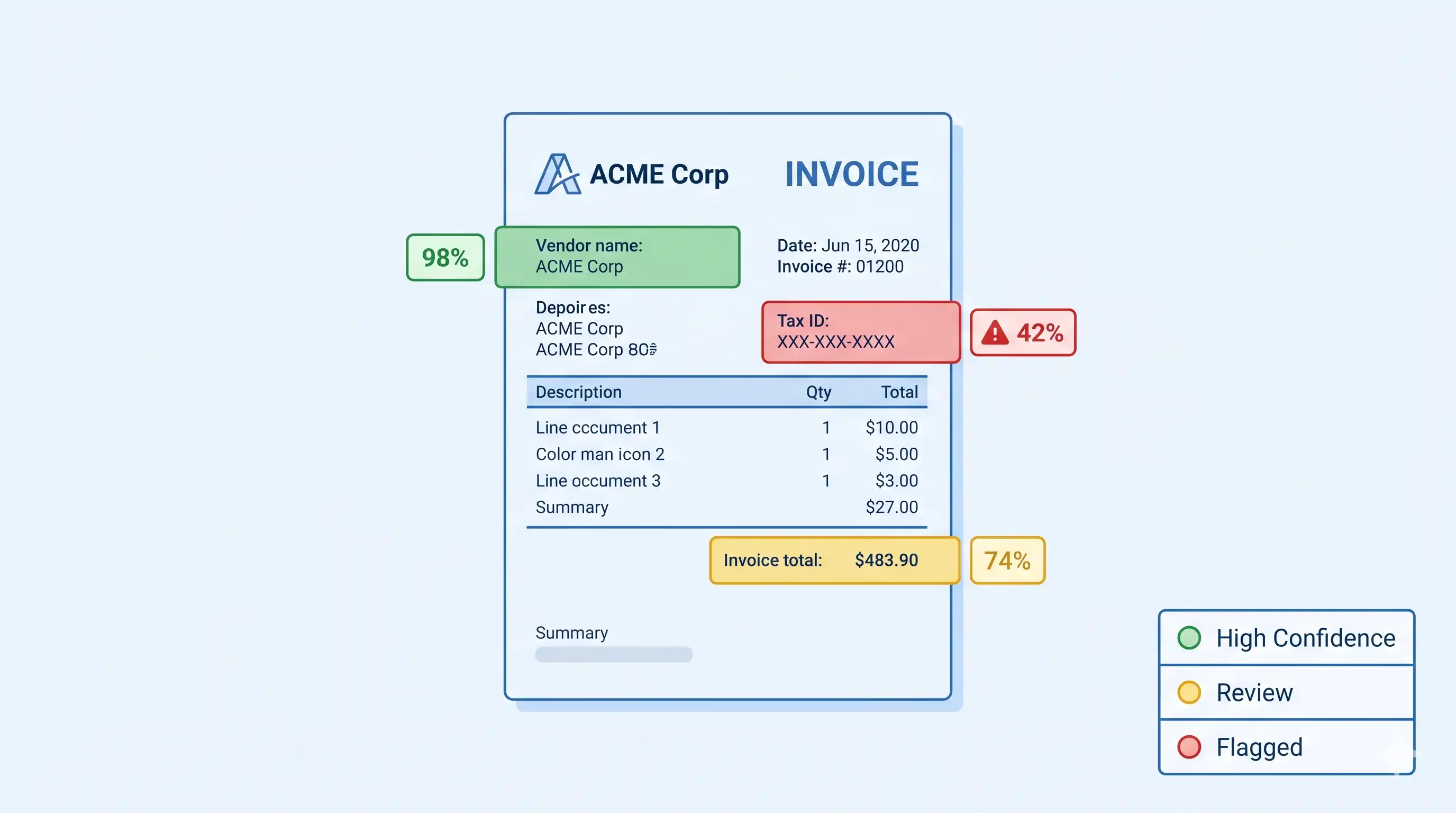
Why it matters: Confidence scoring allows the system to automate high-certainty extractions and surface only the ambiguous ones for human review. This maintains accuracy at scale without requiring humans to check every field on every invoice.
Zonal OCR vs. AI Parsing
Zonal OCR is a legacy approach where you define rectangular "zones" on a document and extract text from those regions. It works well for highly standardized documents (e.g., government forms with fixed layouts) but fails on variable-format invoices.
AI parsing replaces zonal OCR for documents with layout variance. It uses machine learning models — often Vision Language Models (VLMs) — to understand document structure holistically rather than coordinate-by-coordinate.
Structured vs. Semi-Structured Documents
Structured documents have a fixed, predictable layout (e.g., a tax form where every field is always in the same position). OCR with fixed templates works reliably here.
Semi-structured documents have consistent logical fields but variable layouts (e.g., invoices — every invoice has a total and a vendor name, but they appear in different places depending on the sender). This is the category where AI parsing significantly outperforms template OCR.
Straight-Through Processing (STP)
Straight-Through Processing refers to an invoice that is extracted, validated, and posted to the accounting system without any human intervention. STP rate is a key metric for AP automation — higher STP means less manual work.
2025 STP benchmarks:
- •Average AP department: ~32.6% touchless processing rate
- •Best-in-class AP teams: 49–89% touchless processing
- •Processing cost at best-in-class: ~$2.78 per invoice vs. $10–$22 for average manual teams
AI invoice parsing improves STP rates by reducing the number of extraction errors and validation failures that require human review.
The "Adoption Paradox"
Despite mature AI extraction technology, roughly 68% of finance teams still manually key invoice data into their systems as of 2025. This creates a measurable performance gap between best-in-class organizations (who achieve sub-0.1% error rates and 3-day cycle times) and the majority of the market.
Accuracy Benchmarks: OCR vs. AI (2025–2026)
Key insight for 2026: Finance leaders are moving away from measuring "OCR character accuracy" and instead tracking field-level extraction accuracy and touchless processing rates. A system that reads 99% of characters correctly but extracts the wrong field (e.g., confusing a subtotal for a total) is effectively useless for AP automation.
OCR vs. AI Invoice Parsing: Side-by-Side
When to Use Each
Use template-based OCR if:
- •You receive invoices from only 1–3 vendors with identical formats
- •Your documents are always clean, digitally generated PDFs
- •You have technical resources to build and maintain templates
Use AI invoice parsing if:
- •You process invoices from multiple vendors with different formats
- •Your invoices include scanned documents, photographed receipts, or handwritten fields
- •You want to scale extraction without ongoing template maintenance
- •You need structured output ready for 3-way matching or ERP posting
For most businesses processing real-world invoice batches, AI parsing is the correct choice — not because OCR is bad, but because layout variance makes template maintenance impractical at any meaningful volume.
How PerfectParser Handles This
PerfectParser's invoice data extraction uses AI parsing — not template-based OCR — to extract data from invoices of any format, from any vendor, without configuration.
When a low-confidence value is detected, it is flagged for review. High-confidence extractions pass through automatically. The output is always structured and ready for export to Excel, CSV, or direct integration.
If you are processing invoices in bulk, the same AI model handles the full batch without requiring different templates for different vendors.
Try PerfectParser Free
Extract data from your first documents today. No credit card required — 20 free credits included.
Start Extracting →