
Manual invoice processing is one of the most time-consuming and error-prone tasks in any finance operation. If you're handling 50+ invoices a month, you're likely spending 6–10 hours on data entry alone — time that could go toward actually running your business.
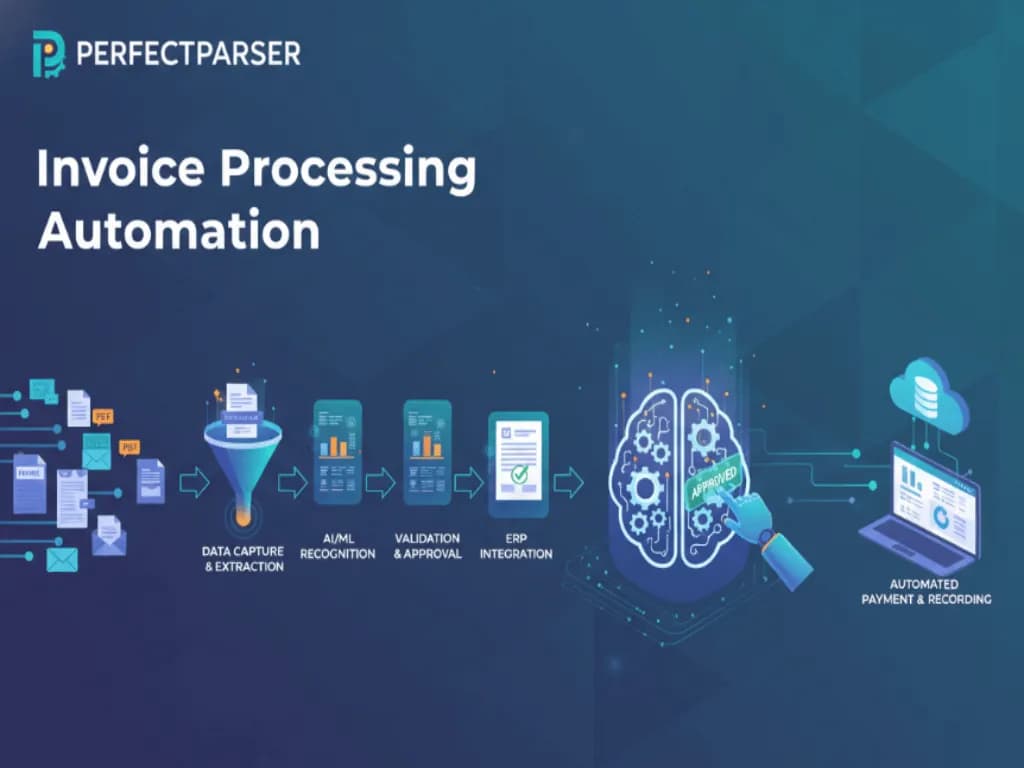
Invoice Processing Automation solves this by using AI and intelligent invoice data extraction to capture, validate, and post invoices automatically — without manual data entry, without templates, and without hiring more staff.
In this guide, we'll cover:
- •What invoice processing automation really means
- •How it works step by step
- •What it actually costs (and what's realistic for small businesses)
- •A comparison of the top tools available in 2026
- •Why modern businesses are moving away from manual processes
The Real Problem with Manual Invoice Processing
Before automation, most small finance teams struggle with:
1. High Error Rates
Manual data entry leads to:
- •Incorrect invoice amounts
- •Duplicate payments
- •Mismatched PO numbers
Even small errors can result in financial loss or vendor disputes. Studies show manual data entry carries an average error rate of 1–4% — on 200 invoices a month, that's 2–8 mistakes every single month.
2. Slow Approval Cycles
Invoices get stuck in inboxes, spreadsheets, or approval loops — causing:
- •Late payments and penalty fees
- •Missed early-payment discounts (typically 1–2% savings)
- •Strained vendor relationships
3. Lack of Visibility
Finance managers often don't know:
- •How many invoices are pending at any moment
- •Where bottlenecks exist in the approval chain
- •Which vendors are unpaid and overdue
4. Scaling Issues
As invoice volume grows, manual processing:
- •Requires more headcount (a full-time AP clerk handles ~500 invoices/month)
- •Increases cost per invoice ($10–$15 manually vs $1–$3 automated)
- •Slows down month-end closing
These are exactly the challenges that Invoice Processing Automation solves.
What Is Invoice Processing Automation?
Invoice Processing Automation is the use of AI and machine learning to automatically handle invoices from receipt to payment.
Instead of humans manually reading invoices, the system:
- •Extracts data automatically (vendor, amount, line items, dates)
- •Validates it against business rules
- •Routes invoices for approval
- •Exports clean, structured data to your accounting software
Platforms like PerfectParser specialize in accurately extracting invoice data from PDFs, scans, and image files — without rigid templates or lengthy setup.
The Invoice Automation Process: From SMBs to ERPs
When setting up an invoice automation process, businesses typically fall into two categories:
- •SMBs and Mid-Market: You need invoice process automation that exports clean CSVs or syncs directly to tools like QuickBooks.
- •Enterprise Operations: You require complex ERP invoice processing where automated invoice processing software pushes data directly into NetSuite, SAP, or Microsoft Dynamics via API.
Whether you need a simple CSV export or full-scale ERP invoice processing, modern tools handle the heavy lifting of invoice processing so your team doesn't have to.
How Does Invoice Processing Automation Work?
Step 1: Invoice Capture
Invoices arrive via email, vendor portals, or scanned paper documents. Automation tools collect them into a single processing queue.
Step 2: Intelligent Data Extraction
AI models extract key invoice fields:
- •Vendor name and address
- •Invoice number and date
- •Line items (description, quantity, unit price, total)
- •Tax, subtotals, and currency
- •Payment terms and due dates
Unlike traditional OCR, modern AI systems like PerfectParser understand layout variations and complex invoice structures — no two invoices need to look the same.
Step 3: Data Validation & Matching
Extracted data is automatically:
- •Matched with purchase orders (2-way or 3-way matching)
- •Validated against predefined rules
- •Checked for duplicates
Exceptions are flagged instantly for human review — but the vast majority pass through without any manual intervention.
Step 4: Approval Workflow
Invoices are routed to the right approvers based on amount thresholds, department, or vendor type. Approvals happen digitally, reducing delays significantly.
Step 5: Export to Accounting Software
Approved invoice data is exported directly to:
- •QuickBooks, Xero, or FreshBooks
- •ERP systems
- •CSV/Excel for manual import
This eliminates re-keying and ensures audit-ready records. If you use QuickBooks, extract invoices with the free Invoice to CSV converter and import under Settings → Import data → Bills. For businesses and distributors managing inventory in Tally, tools can import purchase invoices from PDF into Tally and match line items directly against your existing ledgers.
How Much Does Invoice Processing Automation Cost?
This is the question most guides skip. Here's what's realistic in 2026:
For a business processing 100 invoices/month manually at $10/invoice in staff time, that's $1,000/month in labor. An AI extraction tool at $30/month pays for itself on the first day.
Top Invoice Processing Automation Tools (2026)
Invoice Automation for Small Businesses: What's Actually Realistic
Most automation guides are written for enterprise AP teams with dedicated software budgets. If you're a small business owner or solo accountant, here's what actually applies to you:
You don't need an ERP integration. A tool that extracts invoice data and exports a clean CSV you can import into QuickBooks is enough. That's 90% of the value at 5% of the cost.
You don't need approval workflows. If you're the only approver, skip the workflow features entirely. Just extract → review → post.
Start with your highest-volume document type. If 80% of your invoices come from 5 vendors, automating those alone saves most of your time. You can handle edge cases manually.
A realistic setup for an SMB:
- •Upload invoice PDF to PerfectParser
- •Extracted data (vendor, amount, line items, date) appears in seconds
- •Download as Excel, CSV or JSON
- •Import to QuickBooks or paste into your spreadsheet
That's it. No IT project, no 3-month onboarding, no annual contract. Try it free with 20 credits →
How Invoice Processing Automation Solves Key Pain Points
- •Faster processing: What once took 8–10 minutes per invoice now takes under 30 seconds
- •Lower costs: Processing cost drops from $10–$15 per invoice to under $1
- •Improved accuracy: AI extraction reduces error rates to under 0.5% on standard invoice formats
- •Better vendor relationships: On-time payments improve supplier trust and unlock early-payment discounts
- •Scalability: Handle 10x the invoice volume without adding headcount
Who Should Use Invoice Processing Automation?
Invoice Processing Automation is a practical fit for:
- •Small business owners processing 20+ invoices/month
- •Office managers and bookkeepers tired of manual data entry
- •Accounts payable teams looking to reduce processing costs
- •Freelancers and contractors tracking client invoices and expenses
- •Fast-scaling startups whose invoice volume is outgrowing their team
If invoices are eating into hours you should be spending elsewhere, automation is worth it at almost any volume.
Why Choose an AI-Driven Platform Like PerfectParser?
Not all automation tools are created equal.
PerfectParser focuses on:
- •High-accuracy automated invoice data extraction software with no templates required
- •Handling complex and unstructured invoice formats out of the box
- •Minimal setup — upload and extract in minutes, not weeks
- •Flexible export (JSON, CSV, Excel) that works with any accounting software
It's also built for the documents that come with invoice processing — purchase orders, receipts, and bank statements — so one tool handles your full document workflow.
For teams tracking vendor payments, the vendor invoice tracker and PO to invoice matching tools are free to use alongside extraction.
Key Benefits at a Glance
- •Processing time: 8–10 minutes → under 30 seconds per invoice
- •Error rate: 1–4% manual → under 0.5% automated
- •Cost per invoice: $10–$15 manual → under $1 automated
- •Setup time: Minutes, not months
- •No templates or training data required
Final Thoughts
Manual invoice processing is slow, expensive, and error-prone. Invoice Processing Automation — especially AI-driven extraction — transforms a painful weekly task into something that runs in the background.
For small businesses and solo operators, the barrier to entry has never been lower. You don't need an enterprise budget or an IT team. You need a tool that reads your invoices accurately and gets the data where it needs to go.
Try PerfectParser Free
Extract data from your first documents today. No credit card required — 20 free credits included.
Start Extracting →