
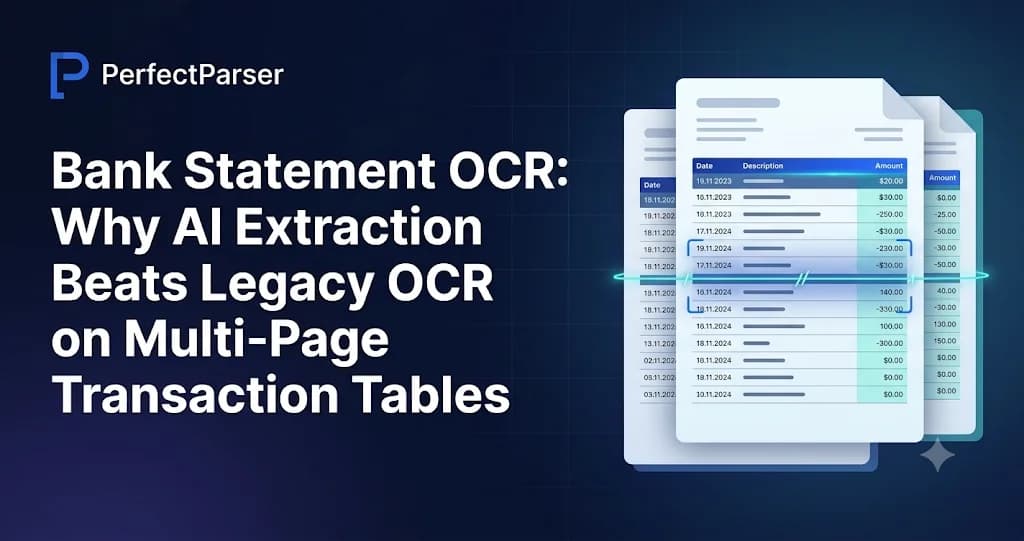
Bank statement OCR converts PDF or scanned bank statements into structured data: dates, descriptions, debits, credits, balances and check details. Legacy OCR reads characters at fixed coordinates and breaks when layouts change or a table spans pages. AI vision-based OCR reads the whole page as a document, recognizes which rows are transactions, stitches tables across page breaks, and maps columns by meaning rather than position. That is why tools like PerfectParser can work across banks without a template for each one.
Why Bank Statement OCR Is Harder Than It Looks
If you have tried OCR for bank statements with a general-purpose engine, you already know the pattern. The text comes out mostly right, and the structure comes out wrong.
An invoice is a handful of labeled fields on one page. A bank statement is a time-ordered ledger printed as a table that can run across a dozen pages, with headers, summaries, promotional text, carried-forward lines, and sometimes check images mixed in. The value of the data depends on the relationships between rows and columns, not on any single cell.
That is why "bank OCR" is its own category. The task is not "read the text on this page." It is "rebuild the transaction ledger the bank intended, in order, with every amount in the correct column."
This guide explains where legacy approaches break, how AI vision models handle dense transaction tables, and what to look for if you are building an automated intake pipeline or evaluating a bank statement parser.
How Legacy OCR Works (and Where It Breaks)
Traditional OCR pipelines, such as Tesseract-style engines and older commercial workflows built on ABBYY-type engines, follow a recognizable sequence:
- Preprocess the image: deskew, binarize, remove noise.
- Segment the page into lines and words.
- Recognize characters and output text with bounding boxes.
- Apply rules or templates to decide what the text means.
Step 4 is where bank statements cause trouble. To turn text into a table, legacy workflows typically use:
- Zonal templates: you define regions, for example "the date is in the first 80 pixels, the amount is between x=420 and x=520."
- Whitespace and ruling-line heuristics: the engine infers columns from gaps or drawn lines.
Both assume a stable layout with cleanly separated columns. Bank statements violate those assumptions constantly.
Common Failure Modes
None of these are exotic. A parser that works only on clean single-page samples will fail in production.
How AI Vision Models Parse Bank Statements
Vision-language models ask "what does this page contain, and how is it organized?" instead of "what characters are at these coordinates?" That changes what the system can do.
1. Template-Free Document Understanding
A vision model processes the page as a visual layout. It can recognize that a block of repeating rows with a date, a text description and numeric values is a transaction table, wherever it sits on the page.
For a team evaluating OCR for bank statements, "template-free" means you do not define pixel regions per bank, and a layout change does not require rebuilding configuration. PerfectParser takes this approach, so the same extraction logic applies to a national bank, a credit union or a digital-first fintech.
2. Semantic Recognition of Headers, Rows and Noise
Because the model interprets meaning, it can separate:
- Account-level fields: account holder, account number (often masked), bank name, statement period.
- Transaction rows: the actual ledger entries.
- Structural noise: repeated headers, page numbers, footers, marketing text.
Without that separation, you spend your time deleting rows that should never have been extracted.
3. Multi-Page Table Stitching
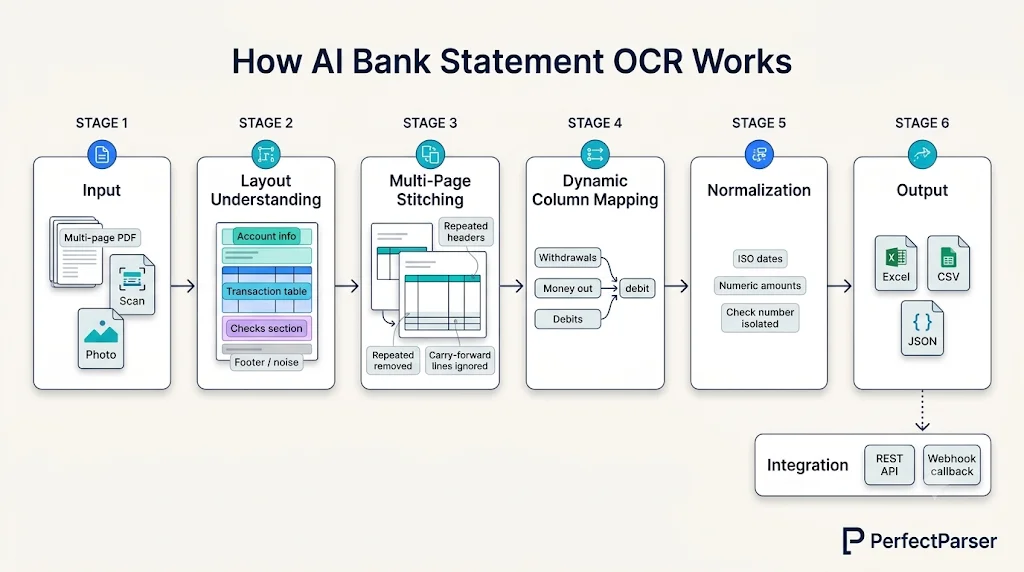
The most important capability for OCR bank statements at scale is treating a multi-page document as a single continuous table. A stitching-aware system recognizes that:
- A header repeated at the top of page 2 is a label, not data.
- A "carried forward" or "brought forward" line is a page-boundary artifact, not a transaction.
- A row that starts at the bottom of one page and finishes on the next is one transaction.
- Row order must be preserved across the entire document.
If you are testing any tool, run a real statement of ten or more pages and compare the extracted row count with the printed one. It is the fastest way to expose a weak implementation.
4. Dynamic Column Mapping
Banks label columns differently: "Withdrawals," "Debits," "Money out," "Payments," "Narrative," "Particulars." A position-based parser treats each variation as a new template. A vision model maps columns by meaning, which makes it possible to normalize heterogeneous statements into one consistent schema.
See It on Your Own Statement
Try a real statement, ideally a multi-page one with checks, and inspect the output row by row:
Frame not loading? Open the free bank statement to Excel tool in a new tab.
Multi-Bank Normalization: One Schema, Many Layouts
If you are building a bank statement parser into a product or workflow, the output schema matters as much as the extraction. Accounting software, underwriting models and data warehouses need consistent fields regardless of which bank produced the PDF.
A practical normalized schema separates account-level data from transaction-level data:
{
  "account": {
    "bank_name": "Example Bank",
    "account_holder": "Acme Trading Ltd",
    "account_number_masked": "****4821",
    "statement_period_start": "2026-09-01",
    "statement_period_end": "2026-09-30",
    "currency": "USD"
  },
  "transactions": [
    {
      "date": "2026-09-02",
      "description": "ACH DEPOSIT PAYROLL ACME",
      "debit": null,
      "credit": 4250.00,
      "balance": 9120.55,
      "type": "deposit"
    },
    {
      "date": "2026-09-04",
      "description": "CHECK 1043",
      "debit": 312.40,
      "credit": null,
      "balance": 8808.15,
      "type": "check",
      "check_number": "1043"
    }
  ]
}
Normalization Decisions That Matter
Debit and credit handling. Some banks print two columns, some one signed column, some append "Dr" and "Cr." A good normalization layer applies one output convention across all banks: separate debit and credit fields, or a single signed amount.
Split withdrawal and deposit sections. Some statements print deposits and withdrawals in separate tables with separate subtotals. The extraction should merge them into one chronological list, or tag each row's section so you can sort it yourself.
Dates. Statements use day-first, month-first, abbreviated months and two-digit years. Normalizing to the ISO 8601 standard (YYYY-MM-DD) prevents ambiguity downstream. Where a date like 04/05/26 is ambiguous, the statement period usually resolves it.
Numbers. Separators vary by region: 1,234.56, 1.234,56 or 1,23,456.78. Amounts should arrive as numbers, not strings.
Descriptions. Raw descriptions contain processor prefixes, card network metadata, and NACHA ACH reference codes. Keep the original text intact, and run any cleaning or categorization as a separate, optional step so you never lose the source value.
Checks: Numbers, Rows and Thumbnail Images
Checks add a wrinkle that general OCR handles poorly. On many statements they appear in several forms:
- A row in the transaction table with a check number in the description or a dedicated column.
- A checks-paid summary listing check number, date and amount, sometimes in a grid that does not match the main table.
- Cleared check images, thumbnails of each check, printed on later pages.
If these are not handled deliberately, check numbers get buried in descriptions, the checks-paid grid is misread as ordinary rows (double-counting transactions), and thumbnails are treated as noise or garbled into text.
Good check extraction should:
- Isolate the check number into its own field when present. PerfectParser's bank statement extraction returns a reference/check number alongside date, description, credit, debit and running balance.
- Recognize the checks-paid section as a distinct table and link or flag it against the main rows instead of silently duplicating them.
- Detect cleared check thumbnails and keep them separate from transaction text.
This matters for controllers and bookkeepers, who often need to tie a specific check number to a specific payment.
Extraction Mechanics: What Good Looks Like Under the Hood
If you are researching OCR PDF bank statement extraction techniques, it helps to know the layers of a modern pipeline.
- Step 1: Classify the input. Is the PDF digital with a text layer, or an image-only scan? A robust pipeline handles both without asking you to preprocess files.
- Step 2: Understand layout. The system identifies regions: header block, summary box, transaction table, check section, footer. This is where template-free understanding replaces zonal coordinates.
- Step 3: Reconstruct the table across pages. Rows from all pages are assembled into one ordered list. Repeated headers, page numbers and carry-forward lines are excluded.
- Step 4: Map columns to your schema. "Withdrawals," "Debits" and "Money out" all become debit.
- Step 5: Normalize types. Dates become ISO dates, amounts become numbers, and missing values become null rather than empty strings or zeros.
- Step 6: Deliver structured output. The result is returned as CSV, Excel or JSON for your application or accounting system.
On Validation
Your application should still apply its own sanity checks: expected row counts, date ordering and amount formats. Extraction produces the transaction data as printed on the statement. Downstream logic, including balance arithmetic and reconciliation against your own records, belongs in your systems, where you control the rules and tolerances.
For bookkeepers, accounting teams, and operations specialists setting up monthly intake into accounting software, see our end-to-end operational guide on extracting data from bank statements to Excel and CSV.
Scanned and Photographed Statements
Clients forward scans, phone photos and image-only exports. Vision models read the rendered image rather than relying on an embedded text layer, so scans go through the same workflow. For a quick conversion without code, our free bank statement to Excel or bank statement to CSV tools are good starting points.
Quality still matters. Skew, shadows, low resolution and tiny fonts reduce accuracy for any system. Practical guidance:
- Scan at 300 dpi or higher.
- Keep photographed pages flat and evenly lit.
- Do not crop the edges of the table.
- Send the whole document, so multi-page stitching has full context.
Batch Processing and Pipelines: API and Webhooks
A one-off upload is fine for testing. Production intake is different. A lender, accounting firm or fintech product may process large numbers of statements, in bulk or triggered by user uploads. In lending, mortgage underwriting, and loan origination systems (LOS), bank statement extraction is commonly packaged alongside other borrower verification documents—such as paystub data extraction for income verification and utility bill data extraction for proof of address—via the same asynchronous API pipeline.
REST API. With the PerfectParser REST API, you submit a PDF or image, receive a job reference, and fetch structured results. This lets you embed extraction in an onboarding flow, document inbox or internal tool.
Webhooks. Long statements take longer than a typical request-response cycle. Instead of polling, you register a URL and receive an automated callback when processing finishes.
Batch ingestion. Upload multiple statements at once, covering multiple months or accounts, and receive consistently structured output. Keep the source filename or your own document ID so every transaction traces back to its file. If you are configuring a parser for the first time, the bank statement setup guide walks through it.
A typical asynchronous flow:
- Your app uploads a statement through the API.
- The API responds immediately with a job ID.
- Processing runs in the background.
- A webhook fires on completion.
- Your service stores the transactions and triggers the next step.
Security basics to ask any vendor about. Financial documents are sensitive, so confirm encryption in transit and at rest, whether your data is used for model training, and how deletion works. PerfectParser states that data is encrypted with TLS in transit and AES-256 at rest, is not used to train AI models, and can be deleted automatically after processing. Also ask about idempotent retries, how failures and partial results are reported, and how long files and results are retained.
Choosing a Bank Statement OCR Approach: A Checklist
Structure
- Does it treat multi-page statements as one continuous table?
- Are repeated headers and carry-forward lines excluded?
- Are wrapped descriptions handled as one transaction?
Flexibility
- Does it work on a bank it has never seen, without a template?
- Does it handle both separate debit/credit columns and signed amounts?
- Does it cope with split withdrawal and deposit sections?
Checks
- Are check numbers isolated into a field?
- Is the checks-paid section handled separately?
- Are cleared check images kept out of text output?
Output
- Are dates and amounts typed and normalized?
- Is the schema consistent across banks?
- Is the original description preserved?
- Can it export to CSV, Excel and JSON?
Integration
- Is there a REST API with clear documentation?
- Are webhooks available?
- Can you process batches and trace results to source files?
Testing (the step most people skip)
- Test on real statements, not vendor samples.
- Include a 10+ page statement, a scan, and one with checks.
- Compare extracted row counts to printed counts before trusting any accuracy claim.
Conclusion
Bank statements punish shortcuts. They are long, varied and structurally unforgiving, and the gap between a usable extraction and a frustrating one comes down to structure: stitching tables across pages, mapping columns by meaning, separating transactions from noise, and handling checks and split sections on their own terms.
Legacy template OCR cannot keep up with that variety, because every new layout is a new maintenance burden. AI vision models change the trade-off by reading the page as a document, which makes template-free, multi-bank extraction practical.
Start with the checklist above, test on your hardest real statements, and choose a solution that returns a consistent schema through an API your team can build on. PerfectParser is pay-per-page with no subscription, and new accounts get 20 free pages with no credit card, so you can test it on your own statements first. See the pricing for details.
Automate Multi-Page Bank Statement OCR with AI
Replace fragile template OCR with vision-based AI. Seamlessly stitch transaction tables across page breaks, isolate check details, and stream normalized JSON or spreadsheets directly into your workflows via REST API. 20 free pages included.
Test AI Bank Statement OCR Free →