
Quick answer: Receipt OCR uses optical character recognition combined with document AI vision models to read photos, scans, and PDFs of till receipts and return structured, typed JSON. Unlike basic OCR engines that produce flat text blobs, modern receipt OCR APIs automatically identify the merchant, transaction date, tax rates, payment method, and itemized line-item arrays without requiring per-vendor coordinate templates.
Ask a finance team which document type causes the most cleanup work, and receipts usually win. Unlike invoice OCR, which typically processes clean PDFs with predictable fields, receipts arrive as whatever the merchant’s till printed and whatever the employee’s phone captured.
Receipts come from every kind of merchant, and none of them agree on a layout. A taxi receipt has three lines. A grocery receipt has forty. A hotel folio spreads across pages. The paper is often thermal, so it fades, curls and goes grey in a wallet. The “document” you need to read is frequently a slightly blurry photo taken in a dim restaurant.
You need structured data, but the input is chaos. That gap is what receipt OCR is meant to close. Modern receipt OCR combines text recognition with AI models that understand receipt structure without per-merchant templates. This guide explains how that works, what data you can expect back, how to integrate a receipt OCR API, how to measure accuracy honestly, and where the limits are.
What Receipt OCR Actually Does
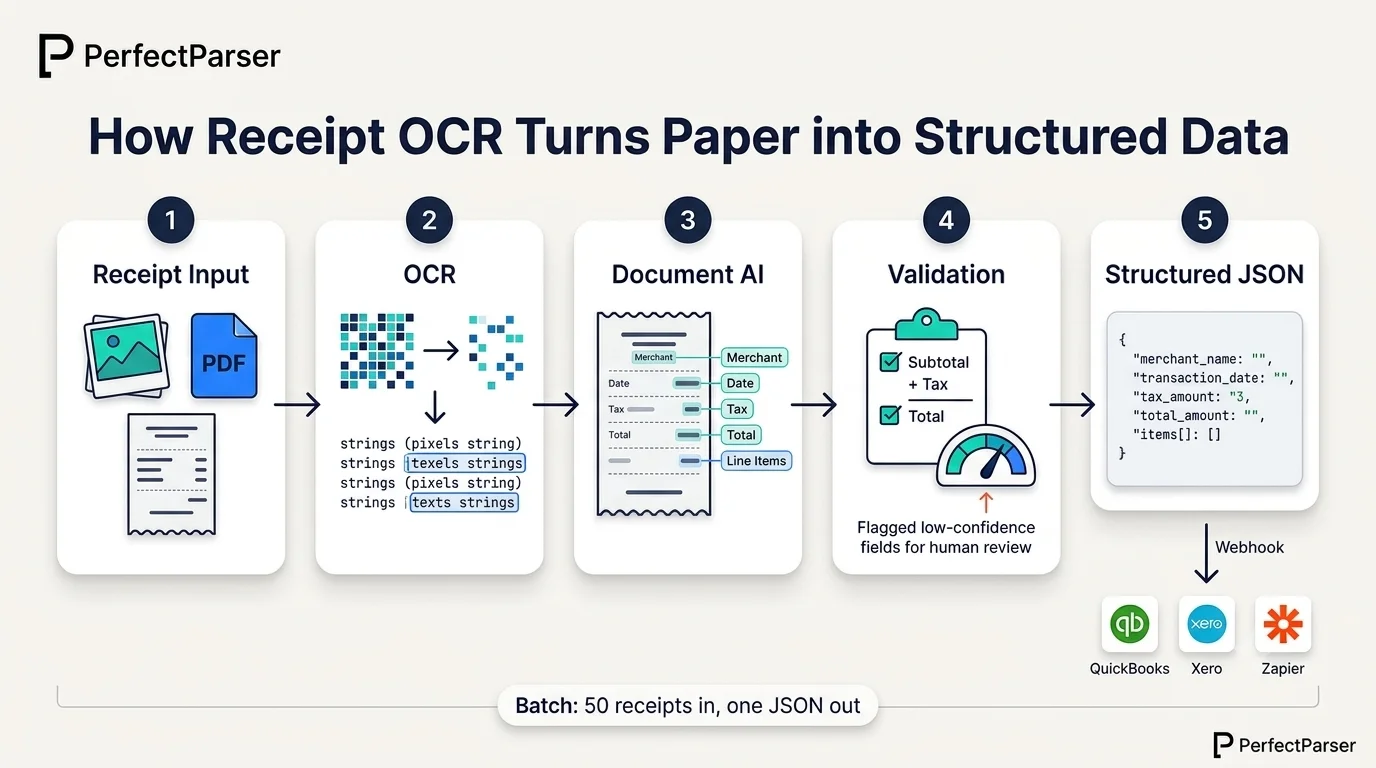
“Receipt OCR” is used as one term, but it covers two separate jobs:
- Step 1: OCR reads pixels into text strings. The engine finds text regions in the image and converts them to characters. It also keeps position information, such as which words sit on the same line and which are in the same column.
- Step 2: Document AI maps strings to schema fields. This is where the system decides that $12.50 is a line-item amount, $48.20 is the subtotal and $52.05 is the final total. Without this step you have a text blob, not data.
The distinction matters when you compare tools. A raw OCR engine can read every character on a receipt correctly and still leave you with nothing usable, because it can’t tell which number is the total. A receipt OCR API returns typed fields.
What you get back
A receipt OCR API returns JSON with typed fields, not raw text: a header object (merchant, date, payment method), a financial summary (subtotal, tax, tip, total) and an array of line items. Your system can consume that directly, with no regex or custom parsing. If you just need a quick one-off browser test on a receipt photo without an API key, you can also use our free image to Excel converter or image to text tool.
Receipt-specific challenges
Receipts have problems that clean business documents don’t:
- Thermal paper: low contrast, heat-damaged areas and uneven fading, especially on older receipts.
- Mobile photos: glare, barrel distortion, skew, shadows and compression artifacts.
- Abbreviated line items: point-of-sale systems print
CHK 2X BURGER $12.50instead of a readable description. - Extreme length variation: a receipt can have two rows or forty, and long ones are often photographed in sections.
- No fixed anchors: the total can be at the top, the bottom, or repeated three times under different labels.
Be clear about what the OCR can and can’t fix. A receipt parser reads the printed text on the image. Accuracy depends on how readable that text is, so a sharp, well-lit capture will always outperform a blurry, shadowed one regardless of the software. Better capture in your app (good lighting prompts, a visible capture frame, retake on blur) improves results more than any model tweak.
The Receipt Data Schema: What Fields Matter
Before you pick a tool, decide which fields your workflow needs. A typical receipt schema has three layers:
Header fields
- Merchant name (often printed as a logo, which text OCR may miss or read badly)
- Address
- Transaction date and time
- Payment method (card type, last four digits or cash)
Financial summary
- Subtotal
- Tax amount (one value or several)
- Tip
- Total
Line items
- Description
- Quantity
- Item amount
Header and summary fields are what most demos show. Line items are what decide whether the data is useful for coding, tax recovery, policy checks and spend analysis.
Why line items are the real challenge
Line items stay hard for several reasons:
- Irregular column alignment: on thermal paper, prices drift away from their descriptions.
- Abbreviated SKU names:
ORG BNLS CHKN BRSTis not a product description a human would write. - Modifiers and sub-items: a line such as “No onions” indented under a burger belongs to the burger and is not a separate purchase.
- Wrapped descriptions: long names wrap onto a second line, and a naive parser reads it as a new item.
- Discounts and refunds: a negative amount could be a coupon, a loyalty discount or a returned item. It changes the meaning of the whole receipt.
- Mixed taxable and non-taxable items on the same receipt.
A good schema is also customizable. If a receipt prints a receipt number, discount code or tax rate, you should be able to add those fields to your extraction schema instead of accepting a fixed set.
Tax on Receipts: The Field Most Guides Skip
Tax is part of the question people search for, and it’s where “looks fine in a demo” turns into real bookkeeping problems.
- Tax appears in many forms: depending on the country and merchant, the label might say VAT, GST, sales tax, service tax or just “tax”. Some receipts print no label and bury the tax inside the total.
- Receipts can show multiple rates: a single receipt may include a reduced rate on food and a standard rate on other goods, each with its own taxable base and amount. If your tool returns one
tax_amount, you lose that breakdown and any recovery or compliance reporting that depends on it. - Tax-inclusive vs. tax-exclusive pricing: in some markets the printed item prices already include tax. In others tax is added at the end. If your logic assumes one, it will produce wrong subtotals for the other.
- Tips and service charges are not tax: on restaurant receipts, a service charge, a tip and tax can all appear near each other. Treating them as one value corrupts the numbers.
Practical advice:
- Decide whether you need a single tax amount or a per-rate breakdown. If you need to reclaim input tax, you want the breakdown.
- Always validate that
subtotal + tax + tip = total, and that the tax is a plausible share of the taxable base for the place of purchase. - Store the tax label as printed, so you can audit it later.
- Don’t convert currencies or recalculate tax inside the OCR step. Extract what is printed, then apply your own rules downstream.
OCR vs Document AI vs LLM: Which Approach Should You Use?
Teams evaluating receipt OCR usually end up comparing four approaches. Here is how they differ:
A note on open-source OCR engines: Tesseract OCR and similar engines are good for learning and experiments, but they aren’t a safe foundation for production receipt parsing. They read characters without understanding receipt structure, and accuracy drops sharply on faded thermal paper and phone photos. Teams that start there usually end up building a fragile layer of rules on top, and then maintaining it indefinitely. A dedicated receipt extraction API such as PerfectParser removes that layer.
The practical recommendation is to use a purpose-built extraction API for the reading and field mapping, then add your own validation and review logic around it. That keeps the model’s job narrow and your business rules in your control.
API Integration Walkthrough
A receipt OCR API is simple to call. (See the API quickstart for authentication and endpoints). Here is the typical flow:
1. Upload
Send the receipt as a PDF, PNG or JPEG. The same endpoint should handle photos, scans and emailed PDFs.
2. Define a schema
You tell the API which fields you want back. A minimal receipt schema looks like this:
// Example schema definition
{
  "merchant_name": "string",
  "transaction_date": "date",
  "tax_amount": "number",
  "total_amount": "number",
  "items": [
    { "description": "string", "quantity": "number", "amount": "number" }
  ]
}
Add fields only if the receipt actually prints them: a receipt number, a discount code, a tax rate or a tip.
3. Read the response
The response mirrors your schema: a header object plus an items array. Each field can carry a confidence score. Treat those scores as routing signals, not as decoration.
4. Batch process
You don’t need to send receipts one by one. Upload 50 receipts at once and get one consolidated JSON response, which suits month-end bundles, historical imports and bulk intake from a shared inbox.
5. Deliver with webhooks
Use a webhook to fire the extracted data to downstream systems when processing completes. Common targets are QuickBooks, Xero and Zapier, from which you can reach almost any other tool in your stack.
A sensible pipeline around the API
- Capture or receive the receipt.
- Send it to the extraction API.
- Run your validation rules on the JSON.
- If everything passes and confidence is high, post it automatically.
- If anything fails or is uncertain, route it to a reviewer with the image and the flagged fields.
- Log the original image, the extracted values and any correction, for audit.
Accuracy Trade-offs and Guardrails
No vendor can promise one accuracy number for all receipts, because the number depends on the inputs. Here is what actually moves it:
What affects accuracy
- Print darkness: strong, dark print reads well, while light print reads poorly.
- Photo angle and quality: sharp, flat, evenly lit images consistently outperform angled, shadowed ones.
- Receipt age: thermal paper kept in a pocket for six months is far harder to parse than a fresh receipt.
- Layout complexity: long receipts with wrapped lines and item modifiers are harder than a three-line taxi slip.
On faded thermal paper, expect lower confidence on financial fields. Tax and total matter most, so those are the fields to validate hardest.
What the API does not do
Set expectations clearly, because many integration problems come from assuming a feature exists:
- No currency conversion: it extracts the currency printed. Convert downstream with your own exchange rates.
- No perspective correction: it reads the printed text in the image. Capture quality remains your responsibility.
- No spend categorization: it extracts what the receipt says. Mapping merchants to expense categories is a separate step in your own system.
- Not a handwriting engine: for hand-filled delivery receipts or notes, use a dedicated handwriting recognition engine.
How to measure accuracy honestly
If you’re evaluating tools, test them properly:
- Collect 100+ of your own receipts, including your worst samples (faded, crumpled, long, foreign-language, or photographed at an angle).
- Label them by hand to establish ground-truth values for every field.
- Measure per field, not per receipt. A receipt with nine correct fields and an incorrect total is a failure for finance, even if it scores 90% overall.
- Track line items separately to check whether rows are merged, split, or detached from their prices.
- Compare exact match vs. close match. "Starbucks" vs. "STARBUCKS COFFEE #4411" may be acceptable for a merchant name, but 52.05 vs. 52.50 never is.
- Record confidence vs. correctness. A well-calibrated system's low-confidence fields should align with actual exceptions, making review queues efficient.
Validation rules that catch silent errors
- Line items sum to the subtotal.
- Subtotal plus tax plus tip equals the total.
- The date is real, not in the future, and inside the claim period.
- Tax is a plausible rate for the place of purchase.
- Required fields (merchant, date, total) are present.
- The same merchant, date and amount hasn’t already been submitted (duplicate check).
Guard against bad and fake receipts
Extraction reads what is on the page. It doesn’t tell you the page is genuine. Edited, AI-generated and duplicated receipts are a growing concern for finance teams, so pair extraction with duplicate detection, a card-transaction match where possible, and policy checks. Treat a clean extraction as a starting point for verification, not proof of a real purchase.
Normalize merchants downstream
Merchant names arrive as printed: AMZN MKTP US*2K4, a logo with no text, or a store number tacked on. If you need consistent vendor names for reporting, apply a merchant-matching step in your own system after extraction.
Regional and language notes
If you handle international receipts, test for date formats (14/03 vs 03/14), decimal and thousands separators (1.234,50 vs 1,234.50), non-Latin scripts and tax terminology. Include those samples in your test set instead of assuming they work.
Use confidence scores to flag rows
Confidence scores let you flag specific fields or rows for human review instead of reviewing whole receipts. Set thresholds by risk: be strict on total and tax, more relaxed on a merchant name you can match later.
Use Cases for Receipt OCR APIs
- Expense automation for field sales teams: reps photograph receipts on the road, the API extracts key fields, and the records land in the expense system with the image attached so finance reviews only exceptions.
- Restaurant supply chain: operators buying from many vendors can ingest receipts across different suppliers in one pipeline without vendor templates. Line items feed inventory and cost tracking.
- E-commerce returns processing: match receipt totals directly to refund amounts, and check line items against returned products before issuing payouts.
- Fuel card programs: extract litres, price per litre and station name from fuel receipts, then compare them with card transactions to spot anomalies.
- Bookkeeping and accounting firms: clients send batches of receipts and phone photos. Batch extraction followed by webhook delivery to accounting software removes manual retyping.
Conclusion
Receipts will never be tidy documents. They are faded, folded, photographed in poor light and printed in every layout a point-of-sale system can produce. The way to handle that is to separate the jobs: use a purpose-built extraction API to read and map the fields, then wrap it in validation, confidence-based routing and a short human review queue.
Focus your evaluation on the hard parts: line items, tax and faded print. Test with your own receipts, measure per field, and be clear about what the tool doesn’t do. Do that, and receipt OCR stops being a retyping shortcut and becomes a reliable data pipeline.
Learn more about our receipt OCR software on the solution page, or read how to export receipt data to Excel or QuickBooks to see where the extracted data goes next.
Build Automated Receipt Parsing into Your Workflow
Extract typed JSON schemas with merchant, line-item arrays, taxes, and confidence scores from thermal paper and mobile camera photos. Zero merchant templates, batch processing for 50+ receipts, and instant webhook delivery to QuickBooks, Xero, or your database. Start with 20 free credits.
Start Building with Receipt OCR Free →