
Quick answer: Driver’s license OCR uses AI vision models to read front and back photos or scans of driver’s licenses and return structured fields—name, license number, date of birth, class, endorsements, issue and expiry dates, and component-level residential address—across all 50 US states, Canadian provinces, and international formats without per-state templates.
A customer hands over a license at the rental counter. Your agent squints at it, types a license number, guesses whether that character is a zero or the letter O, and then asks the customer to read out their address because the card is worn. Multiply that by every pickup, every new driver, every tenant application, and every gig-platform signup, and you have one of the most common sources of bad data in operations.
Drivers license OCR replaces that manual typing. It reads a photo or scan of a US driver’s license and returns structured fields: name, license number, date of birth, class, endorsements, issue and expiry dates, and residential address. The hard part is not reading one license. It is reading all of them, across 50 states, several card generations per state, Canadian provinces, and whatever the customer’s phone camera produced at the counter.
This guide covers how AI-based OCR for driver’s licenses works, why multi-state variation breaks simple tools, how front and back sides should be handled together, how to normalize what comes out, and where extraction ends and verification begins.
Why multi-state licenses are chaos
The US has no single driver’s license. Each state, plus DC and the territories, designs and issues its own. There is a shared standard for card design and the data on it, but states interpret it differently and update designs on their own schedule.
For anyone processing licenses at volume, this creates four recurring problems.
1. Layout differs by state and by year. The name may sit above or below the photo. The address may take two lines in one state and three in another. Older cards stay valid after a redesign, so a counter agent in 2026 may see several generations of the same state’s license in one afternoon.
2. Orientation changes. Many states issue vertically oriented licenses to drivers under 21, so a system that expects a horizontal card can fail on exactly the young renters or new gig drivers you most need to onboard.
3. Labels and codes are not uniform. Standard passenger licenses are called different things in different places. California and Texas use Class C. Florida uses Class E. New York and Massachusetts use Class D. A downstream system that expects a single value for “regular license” will mishandle at least some of them.
4. License number formats vary. Commonly seen examples include a letter plus seven digits in California, eight digits in Texas, and a letter plus twelve digits in Florida. Formats change over time, so treat these as illustrations and never hardcode them as permanent rules.
Add real-world capture conditions (glare on laminate, a thumb in the frame, a cracked card, a dim parking lot) and you can see why template-only approaches struggle. A template tuned to one state’s 2019 design has no idea what to do with a 2024 redesign.
What is actually on a driver’s license?
Before extraction, it helps to know what you are extracting. A typical US license carries:
The front carries most of what a human reads. The back is where many states place additional machine-readable data. A workflow that photographs only the front can miss information the back provides, which is why front-and-back handling is a core requirement.
How AI vision OCR reads a driver’s license
Older OCR driver’s license tools worked like a flatbed scanner for text. They converted pixels into characters and handed you a block of text, leaving you to figure out which line was the license number. That works only if every card has the same layout, which they do not.
Modern AI vision OCR approaches the job in layers.
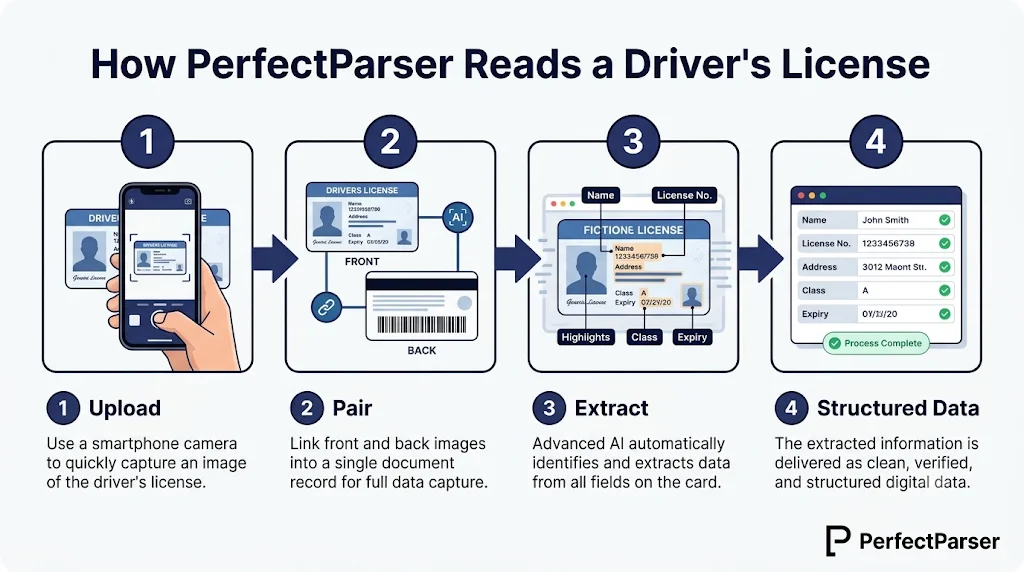
Step 1: Detect and prepare the document. The system finds the card within the image, corrects rotation and skew, and handles the vertical-versus-horizontal problem before any text is read. A photo of a license on a countertop at an angle becomes a clean, upright document.
Step 2: Understand the layout. Rather than reading characters at fixed coordinates, the model learns what a license looks like: where names tend to appear, how address blocks are structured, and how labels relate to values. This is what lets a system adapt to a state redesign it has never seen.
Step 3: Read and label the fields. The text is read and assigned to meaningful fields such as license number, date of birth, and expiry date. The label next to a value, the field’s position, and the format of the value itself all provide clues.
Step 4: Return structured output. The result is organized data, not a text dump, so your rental system, fleet platform, or screening workflow can use it directly.
Layout understanding is the key difference. Reading characters is a solved problem. Knowing that the nine-digit string next to the “DL” label is the license number and not the document discriminator is where most real-world errors occur.
PerfectParser is built around this approach. It adapts to all 50 US state layouts, REAL ID star variations, Canadian provincial licenses, and international formats, and it extracts the license number, full name, residential address, date of birth, expiry date, issue date, class, and endorsements.
Driver license front and back extraction: why one record beats two photos
Most tools treat each image as an independent document. That is a problem when the front and back of one license arrive as two separate uploads and your system has no reliable way to know they belong together.
Multi-side document pairing solves this. The front photo and the back photo are associated with each other in a single record, so a driver is represented by one entry with all of their license data attached.
Why this matters in practice:
- Counter workflows produce two photos. An agent or customer snaps the front, then flips the card and snaps the back. Without pairing, those become two unrelated files that someone must reconcile later.
- Batch uploads get shuffled. A fleet onboarding lead who uploads 80 new drivers’ licenses at once will end up with fronts and backs interleaved. Pairing prevents the wrong back from attaching to the wrong front.
- Completeness checks become possible. If a record is missing its back, you can catch that at intake instead of discovering it during an audit.
- The record stays whole. One driver, one record, with both sides attached, is far easier to retrieve, audit, and hand to a downstream system.
A note on the barcode
Most US licenses carry a two-dimensional barcode on the back that encodes a machine-readable copy of core identity data. It exists because the front is designed for people and the barcode is designed for machines.
It is worth being precise about scope here. PerfectParser extracts data from the card images and keeps front and back together in one record. It does not perform forensic authenticity analysis on the barcode. If your risk process requires barcode forgery detection, that is a separate verification capability and should be handled by a dedicated tool alongside extraction. We cover the extraction-versus-verification boundary in more detail below.
Address extraction: the field that causes the most downstream pain
Name and license number get most of the attention, but the residential address is often the field that breaks workflows later. It feeds contracts, invoices, tenant files, insurance forms, and onboarding records, and it is the field most likely to be messy.
Here are the common address problems when you extract from licenses:
- Multi-line addresses. Apartment, unit, and suite designators may sit on a second line, and different states format this differently.
- Abbreviations and casing. “STREET,” “St,” and “ST.” all mean the same thing but will not match in a database.
- Truncated or crowded text. Long street names get squeezed onto the card.
- ZIP code completeness. Some cards show five digits, others nine.
- Out-of-date addresses. People move. The address on a card issued three years ago may not be where the customer lives now. Treat the license address as what the card says, not as proof of current residence.
Good extraction separates the address into its components (street, unit, city, state, ZIP) instead of returning one long string. Component-level fields are what let you validate, standardize, and geocode downstream. A single blob of text forces someone to parse it again, which reintroduces the exact manual work you were trying to remove.
Format normalization: turning raw output into usable data
Reading the card correctly is only half the job. The other half is driver license OCR output that your systems can actually consume. Without normalization, you end up with technically correct data that does not match anything.
Key areas to normalize:
Dates. US cards use month/day/year, but systems elsewhere may expect year-first formats. Pick one standard (ISO 8601 is a safe choice) and convert everything to it. Be especially careful with dates of birth and expiry dates, where a swapped day and month can flip a legal-age decision.
Names. Cards may show names in last-first order, in all caps, or with suffixes. Decide how you store given name, middle name, family name, and suffix, and apply that consistently.
Class and endorsement codes. Map state-specific class labels to the categories your business uses. A rental company might only care about “can this person drive a standard passenger vehicle,” while a fleet needs to distinguish commercial classes and endorsements. Commercial endorsement codes (for example H for hazardous materials, N for tank vehicles, P for passengers, S for school bus, T for double and triple trailers, and X for combined tank and hazmat) are meaningful to fleets, and state-level variations exist, so keep the mapping table maintained.
Addresses. Standardize abbreviations, casing, and ZIP formats so addresses match across systems.
License numbers. Strip stray spaces and dashes consistently. Keep the original as shown if you need an audit trail, and store a normalized version for matching.
Treat normalization rules as configuration, not code. They change, and the person maintaining them is often an operations manager, not an engineer.
OCR for driver license: how the 50 states compare
A state-by-state manual is beyond what any single article can responsibly provide, because designs change often. What matters is understanding the categories of variation your system must handle.
This is why a system built for one state’s licenses does not scale. The practical question for any buyer is not “does it work on a California license?” but “what happens when a driver from a state you did not plan for hands over a card?” A solution that adapts across all 50 states, Canadian provinces, and international formats removes the need to maintain state-specific templates yourself—and pairs naturally with passport OCR if you also accept international travel documents.
REAL ID stars
REAL ID-compliant cards carry a star marking, and its look and placement vary by state. For some businesses this matters directly, for example when a policy says which ID types you accept or when staff need to distinguish compliant cards from standard ones. Capturing whether a star is present gives you a field you can use for policy decisions instead of relying on an agent’s eyes.
Drivers license verification software: where extraction ends and verification begins
Many buyers search for drivers license verification software when what they need first is accurate data capture. The two are related but distinct, and being clear about the difference protects you from buying the wrong thing.
What extraction does:
- Reads the card and returns what it says.
- Flags things visible on the card itself, such as an expiry date that has already passed or required fields that are missing.
- Pairs front and back into one record.
- Eliminates manual typing and its errors.
What extraction does not do:
- It does not query state DMV databases. PerfectParser is not an automated DMV lookup service. It cannot tell you whether a license has been suspended or revoked, or how many points are on a driving record.
- It does not perform PDF417 barcode forgery forensics. It extracts data from the card images; it does not analyze the barcode to determine whether the card is counterfeit.
If your business needs driving-record checks (many rental, fleet, and insurance workflows do), that is a separate service that typically requires its own permissions and agreements. If you need authenticity forensics, that is another separate capability.
The practical architecture is layered. Extraction gives you clean, structured data quickly. That data can then feed a DMV or motor vehicle record check, an identity verification service, a KYC document extraction pipeline, or your own review process. Extraction does the first, most labor-intensive step, and it makes every later step faster because the data going in is already clean.
For most operations teams, this ordering is also the right priority. Bad data going into a verification service produces failed lookups and manual rework. Accurate extraction up front reduces that.
Handling mobile phone uploads at counter check-in
Phone cameras are now the default capture device. Customers upload from their own phones before arrival, and agents snap photos at the counter. Mobile capture is convenient and messy.
Common problems:
- Glare from overhead lights on laminated cards
- Blur from a shaky hand
- The card photographed at an angle
- Fingers covering part of the card
- Low light in parking garages and vehicle lots
- Cropped edges that cut off the address block
What helps, regardless of vendor:
- Ask for the card flat on a plain, contrasting surface.
- Capture both sides, every time.
- Avoid flash directly on laminate.
- Show a live framing guide in your upload flow.
- Re-prompt immediately if an image is unusable. It is far cheaper to retake a photo at the counter than to chase a customer after they have left.
A good extraction system should tolerate real-world imperfection, because you cannot control how every customer takes a photo. PerfectParser is designed for mobile uploads taken at counter check-in, so the photo an agent takes on a phone is a supported input, not a workaround.
How it works across your operations
Car rental operations managers
Counter time is money. Typing a license number and address for every rental creates queues and errors. With extraction, the agent photographs both sides, the record is created, and the data flows into the rental agreement. The expiry date is checked against the rental period, and the class confirms the driver is eligible for the vehicle category. For out-of-state and international customers, the system handles formats the agent has never seen.
Fleet management directors
Fleets deal with a constant stream of new drivers, often across state lines and often in bulk. Extracting class and endorsement data lets you check whether a driver holds what the role requires, and expiry dates let you build renewal tracking so a lapsed license does not go unnoticed until an incident. Pairing front and back in one record keeps driver files complete for audits.
Equipment rental controllers
Renting heavy equipment often requires specific license classes or proof of identity and address for contracts. Extraction produces the records you need without a clerk retyping data, and the structured address feeds directly into contracts and billing.
Tenant screening coordinators
Screening starts with accurate identity and address data. Extraction removes transcription errors from the first step, so downstream screening requests are built from clean information. Because the address on a license may be out of date, treat it as one data point to compare against the application, not as the final word.
Gig economy onboarding leads
Onboarding thousands of drivers requires speed and low friction. Mobile upload of both sides, automatic pairing, and instant extraction of name, license number, expiry, and class keep applicants moving. Drivers abandon signups that ask them to type out long forms, so removing manual entry improves completion rates as well as data quality.
Building a review step that actually works
No OCR system is perfect, and a mature workflow plans for that. A few practices consistently pay off:
- Validate what you can automatically. Is the expiry date in the future? Is the date of birth plausible? Are required fields present? Does the license number match the expected length for the issuing state?
- Route exceptions to a person. Anything unreadable, missing, or inconsistent should reach a human with the image next to the extracted data, so they can fix it in seconds instead of starting over.
- Compare against what the customer told you. Name and date of birth on the card should agree with the booking or application. A mismatch is worth a second look, though an address difference may simply mean the person moved.
- Keep an audit trail. Store the images and the extracted fields together so you can show what was captured and when.
- Measure by field, not just overall. A tool that is excellent on names but weak on addresses will fail you in exactly the place you care about. Ask for or run field-level accuracy tests on your own samples.
How to evaluate a driver’s license OCR solution
When comparing tools, test with your own documents rather than a vendor’s demo set. Use this checklist:
- State coverage. Does it handle all 50 states, including older card generations and vertical licenses?
- Both sides. Can it pair front and back into one record automatically?
- Address quality. Does it return components or one blob?
- Field coverage. Does it return license number, name, address, date of birth, issue date, expiry date, class, and endorsements?
- Mobile photo tolerance. Test glare, angle, and blur on real phone images.
- Canadian and international support. Important if you serve cross-border customers or foreign renters.
- Honest scope. Does the vendor clearly state what it does not do (DMV lookups, forgery forensics), or does it blur extraction and verification?
- Integration. Can it deliver structured data into the systems you already run?
- Data handling. How are images stored, for how long, and who can access them?
The last point deserves care. A license image contains sensitive personal information. Limit who can see it, keep it only as long as you need it, and understand the privacy and retention rules that apply in the states where you operate. Rules on scanning and retaining license data vary, so check with your legal or compliance team before you finalize your process.
Implementation checklist
Use this as a starting plan:
- Define the fields you need and the downstream systems that will use them.
- Decide your standards for dates, names, addresses, and class codes.
- Build a capture flow that asks for both sides and gives instant feedback on bad photos.
- Set your automatic validation rules (expiry, completeness, age).
- Create an exception queue and assign an owner.
- Test on a real sample set that includes several states, vertical cards, worn cards, and phone photos taken in poor conditions.
- Decide separately how you will handle driving-record checks and authenticity checks, because extraction does not replace them.
- Document retention and access rules for license images.
The bottom line
Reading one license is easy. Reading licenses from every state, in every condition, from both sides, and turning them into clean, standardized records is where manual processes and template-based tools fall apart. The winning approach pairs front and back into one record, adapts to any state layout, returns address components instead of text blobs, and is honest about where extraction ends and verification begins.
Automate 50-State Front & Back Driver’s License Extraction
Upload front-and-back samples from different states—including vertical under-21 cards and mobile counter photos—to extract normalized names, license numbers, classes, and component addresses. Start with 20 free credits, no credit card required.
Test Driver’s License OCR Free →