
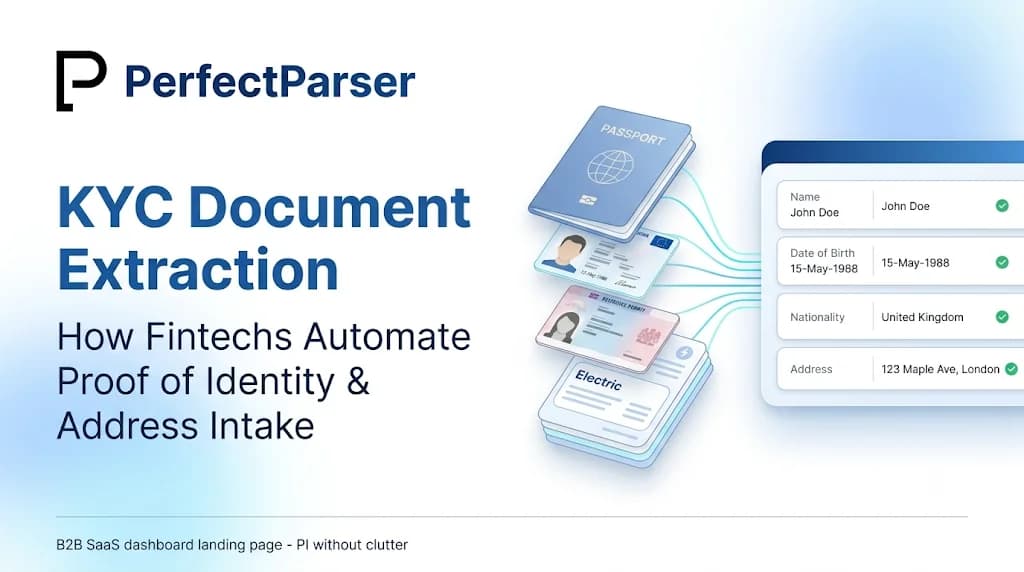
Quick answer: KYC document extraction—powered by a proof of identity parser—is the step that turns an uploaded passport, national ID, residence permit, utility bill, or bank statement into structured data your compliance engine can use. When it’s done well, onboarding analysts stop retyping names and addresses and only review exceptions. This guide covers what the extraction layer does, which fields to capture from each document type, how to route by confidence, what manual review really costs, and how to handle GDPR data minimization—while keeping biometric checks and sanctions screening separate.
What Is KYC Document Extraction?
KYC document extraction is the automated capture of customer details from identity and address documents during onboarding. A customer uploads a passport, national ID card, residence permit, utility bill, or bank statement. The extraction layer classifies the document, reads it, and returns structured fields such as full name, date of birth, nationality, document number, expiry date, tax ID, and address lines.
Teams often use it under different names: OCR KYC, KYC OCR, a proof of identity data extractor, or a proof of address data extractor. They all describe the same job: replacing a person typing data from an image into a form.
The extracted data feeds your case management system, rules engine, or core banking platform. The decision logic then runs on clean fields instead of pixels.
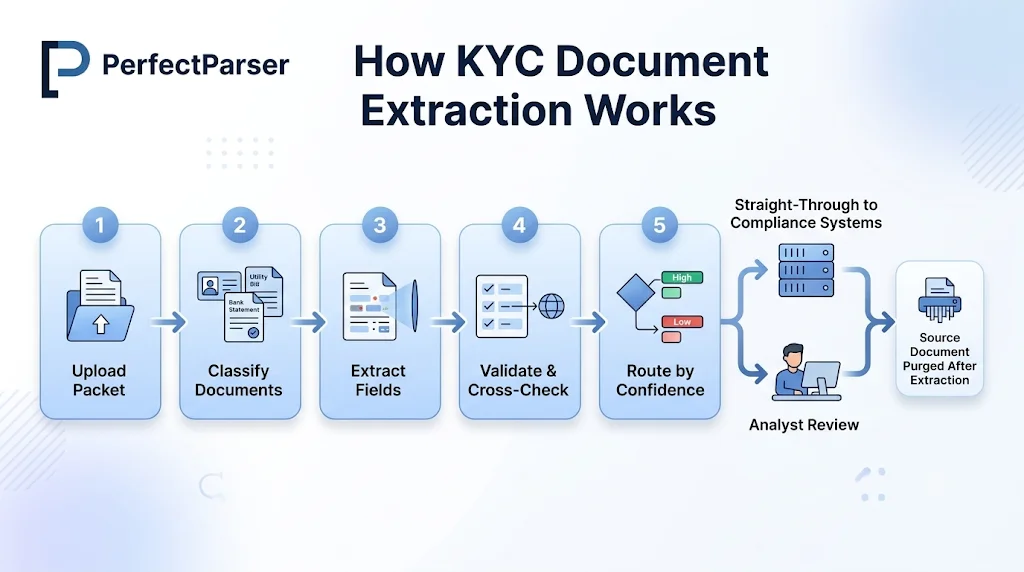
Where extraction sits in a typical onboarding flow:
- The customer submits an application and uploads documents.
- Extraction classifies each document and returns structured data with confidence scores.
- Validation rules check completeness, expiry, and cross-document consistency.
- Clean cases pass straight through to your downstream compliance systems.
- Ambiguous cases go to an analyst with the flagged fields highlighted.
- Separate controls (biometric liveness, sanctions and PEP screening, risk scoring) run according to your policy.
Steps 2 to 4 are what this article is about.
Why Manual KYC Data Entry Doesn’t Scale
Before the technical detail, here’s the operational problem.
Every KYC file has a data-entry component. Someone opens an image, finds the name, reads the date of birth, and types the address into a system. That work is slow, repetitive, and error-prone. A single transposed digit in a document number or a misspelled surname can cause a failed match later in the process.
The regulatory floor makes this unavoidable. In the US, a bank’s Customer Identification Program must collect at least a name, date of birth (for individuals), an address, and an identification number before opening an account. Beneficial ownership rules add owner and control-person data for business customers. Other jurisdictions have comparable minimums, and the EU is moving to a single AML rulebook that applies from July 2027. Whatever the market, the minimum data set has to come from somewhere, and for remote onboarding it comes from uploaded documents.
Speed matters commercially too. A 2025 industry survey from a client lifecycle vendor reported that a large majority of financial institutions lost clients to slow onboarding. It’s a vendor study, so treat the exact figure with caution, but the direction matches what every onboarding team sees: customers abandon when verification drags on.
How OCR KYC Works Under the Hood
Modern KYC OCR is more than character recognition. A production pipeline has several stages, and weakness in any one of them shows up as exceptions in the review queue.
1. Ingestion and image quality checks
Customers upload photos taken on phones, scans, and PDFs, often of poor quality. The first stage normalizes orientation, crops the document, and rejects unusable inputs early (blurred, cut off, or covered by glare) so the customer can retry immediately. Rejecting a bad upload in seconds is far cheaper than rejecting a file three days later.
2. Document classification
The system has to know what it’s reading. A passport data page, a national ID front, a residence permit, a utility bill, and a bank statement each carry different fields in different places. Classification also catches wrong-document submissions, such as a customer uploading a selfie where a proof of address belongs.
3. Field extraction
For identity documents, extraction combines the visible text with the machine-readable zone (MRZ) where one exists. Passports and many ID cards follow the ICAO 9303 standard, which includes check digits (see our passport OCR guide for how VIZ and MRZ extraction works). Those check digits give you a free consistency test: if the MRZ values don’t validate, the read is wrong or the document is suspect. US driver’s licenses carry a PDF417 barcode on the back, which encodes the same identity data in a structured form that can be compared with the printed front via driver’s license OCR.
For address documents, extraction pulls the account holder name, service or mailing address, provider, and issue date.
4. Normalization and validation
Raw text isn’t data yet. Dates arrive as 03/04/2026 and could mean March 4 or April 3. Names arrive in different orders and with accents or transliterations. Addresses need splitting into street, city, region, and postal code. This stage standardizes formats and applies rules such as “document must be unexpired” and “all required fields present.”
5. Confidence scoring and routing
Each field gets a confidence score. Your thresholds decide what happens next. This is where straight-through processing is won or lost, and we cover it in detail below.
What to Extract: Proof of Identity Data Extractor Fields
A proof of identity data extractor should return a consistent schema regardless of which document the customer uploads. Here’s a practical field set by document type.
Two practical notes:
- Don’t assume the ID contains an address. Passports generally don’t. Some national IDs do, some don’t. That’s why proof of address is a separate document.
- Tax IDs vary widely. Some countries print a national or tax number on the ID, others don’t. Your schema should allow the field to be empty without treating that as an error.
Residence permit data extractor: the global documents challenge
Residence permits deserve their own attention because fintechs serving migrants, expats, and cross-border customers see them constantly. A residence permit data extractor has to cope with:
- Different layouts per issuing country, and often per permit generation
- Permit categories and conditions (work, study, family) that matter to risk policy
- Expiry dates that are as important as the holder’s identity, since an expired permit may invalidate the document
- MRZ formats that differ from passports
For compliance teams, the permit’s expiry date and category are often the data points that trigger a follow-up. Capturing them reliably as structured fields lets your rules engine flag a permit that expires in 30 days without anyone reading the card.
What to Extract: Proof of Address Data Extractor Fields
Proof of address is where many extraction projects stall, because address documents have no standard layout. A utility bill from one provider looks nothing like another’s, requiring dedicated utility bill data extraction. A bank statement is a multi-page PDF with the address buried in the header, which depends on reliable bank statement data extraction.
A proof of address data extractor should return:
- Account holder name as printed
- Full address, both as printed and split into components (street, unit, city, region, postal code, country)
- Document type (utility bill, bank statement, tenancy agreement, government letter)
- Provider or issuer name
- Issue or statement date, which drives recency checks
- Statement period, for bank statements
Acceptable address documents and recency
Which documents you accept, and how recent they must be, is a matter for your compliance policy and your regulator. Many firms set a recency window, commonly around three months for utility bills and bank statements, but the right number depends on your jurisdiction, risk appetite, and licensing conditions. Treat any specific window you read online, including this one, as an example, and confirm it with your compliance counsel. The extraction layer’s job is to return the issue date reliably so your policy can be applied automatically.
Address-specific problems
- Format variation. Address order differs by country. A postcode may come before or after the city.
- P.O. boxes and care-of addresses. These may be valid mailing addresses but fail a residential-address requirement.
- Multi-page and multi-column statements. The address may appear on page one only, or in a window envelope panel.
- Name mismatches. A bill addressed to a spouse or a company isn’t proof of address for the applicant. Extraction surfaces the mismatch. Your policy decides what to do about it.
Multi-Document Packet Processing: The Real Value
Reading one document is useful. Reading a customer’s whole packet is where an automated KYC process earns its keep.
Real onboarding packets pair documents: a passport or residence permit alongside a utility bill or bank statement, sometimes with a KYC form attached. Processing them together enables cross-document checks that a single-document reader can’t do:
- Does the name on the proof of address match the name on the ID?
- Does the address on the utility bill match the address entered on the application form?
- Does the date of birth on the ID match the form?
- Is every document unexpired and within your recency window?
Each is a simple comparison once the data is structured. Each is slow and error-prone when an analyst does it by eye across three open images.
PerfectParser handles the extraction step cleanly: it takes a customer’s uploaded documents, extracts personal identifiers (name, date of birth, nationality, tax ID where present), raw MRZ lines, and address lines into structured output so your own rules engine can run cross-document comparisons.
The KYC form data extractor
Many onboarding flows also include a paper or PDF application form: a scanned account-opening form, a signed declaration, or a questionnaire. A KYC form data extractor reads those fields too, so the declared data (name, address, occupation, source of funds statement) can be compared with the document data. This is often the quickest cross-check available: what the customer said versus what their documents show.
Straight-Through Processing and Confidence Routing
Straight-through processing (STP) means a clean application passes from upload to your compliance system without a human touching it. It’s the headline benefit of automated KYC solutions, and it’s also widely overpromised.
Industry guides describe a persistent gap: field-level extraction accuracy on standard documents can be very high, yet end-to-end STP rates are much lower, because a case can fail for reasons other than reading errors. A passport can be read perfectly and still be escalated because of missing data, a conflicting address, or an expired permit. Plan for exceptions rather than treating them as failures.
Field-level confidence, not document-level
Don’t fail a whole application because one field is uncertain. Route by field. A sample extraction response might look like this:
{
  "customer_packet_id": "pkt_000417",
  "documents": [
    {
      "type": "passport",
      "fields": {
        "full_name": { "value": "María José Álvarez Soto", "confidence": 0.98 },
        "date_of_birth": { "value": "1991-03-04", "confidence": 0.99 },
        "nationality": { "value": "ESP", "confidence": 0.99 },
        "document_number": { "value": "XXX123456", "confidence": 0.97 },
        "expiry_date": { "value": "2031-08-19", "confidence": 0.99 }
      },
      "mrz_check_digits_valid": true
    },
    {
      "type": "utility_bill",
      "fields": {
        "account_holder": { "value": "Maria Jose Alvarez Soto", "confidence": 0.93 },
        "address_line_1": { "value": "Calle Example 14, 3B", "confidence": 0.88 },
        "postal_code": { "value": "28001", "confidence": 0.96 },
        "issue_date": { "value": "2026-10-02", "confidence": 0.95 }
      }
    }
  ],
  "cross_checks": {
    "name_match": "match_after_normalization",
    "form_address_match": "review"
  }
}
The values above are illustrative of a combined extraction-and-rules payload, and the design principle is what matters: keep per-field confidence explicit, extract raw MRZ strings alongside visual fields, and run check-digit validation and cross-document checks in your downstream compliance rules. (Note: PerfectParser extracts the structured fields and raw MRZ strings as text; check-digit verification and cross-document mismatch flagging happen in your own workflow.)
A routing table you can adapt
Thresholds should be set by document type and by field. A date of birth deserves a stricter cutoff than a secondary address line. Start conservative, measure how often reviewers change flagged values, and loosen thresholds only where the data justifies it.
Edge Cases That Break Naive Extraction
If you want your straight-through rate to hold up in production, test your extraction against the messy cases, not the sample documents in a vendor demo.
- Diacritics and transliteration. “José” versus “Jose,” or a name rendered in Latin letters on the MRZ and in another script on the visual zone. Normalize before comparing, and keep the original.
- Multiple surnames and name order. Many countries use two family names. Some write family name first. Don’t force every name into a first-and-last-name model.
- Date formats. Day-month versus month-day ambiguity is a classic source of silent errors. Use the document’s issuing country to resolve it.
- Glare, shadows, and cropped edges. Particularly on laminated cards photographed under bright light.
- Multi-page PDFs. Bank statements with the address on page one and transactions on pages two to twelve.
- Mixed-language documents. Bilingual cards and bills where field labels appear in two languages.
- Expired but recently renewed documents. Customers uploading the old document by mistake.
Build a test set from your own real submissions, including the ugly ones, and track field-level accuracy against it. Accuracy on pristine samples tells you very little.
Where KYC Document Extraction Stops
It’s worth being precise about boundaries, because compliance teams are right to ask.
Extraction reads and structures documents. It does not:
- Verify that the person holding the phone is the person on the ID. Biometric selfie matching and liveness detection are separate controls.
- Check customers against government intelligence databases.
- Screen names against PEP lists, sanctions lists, or adverse media.
PerfectParser doesn’t perform those functions. A complete KYC program still includes them, supplied by specialist providers or your own compliance stack. The point of extraction is to give those downstream controls clean, structured, trustworthy inputs. A sanctions screen run on a misspelled name is a weak screen, so better data upstream improves everything downstream.
This separation also affects cost. Identity verification platforms typically charge per check, and costs add up fast at volume. Using extraction for data capture lets you decide, by policy and risk tier, which customers actually need the heavier, per-check controls, instead of running every applicant through a monolithic flow just to get their name into a database.
KYC Document Review Cost: The Labor Economics
Most teams underestimate their KYC document review cost because the work is spread across analysts and hidden inside “onboarding time.” Here’s a simple model you can rebuild with your own numbers.
Assumptions (illustrative, replace with your own):
- 10,000 onboarding packets per month
- Each packet has two documents (an ID and an address document)
- Manual review and keying takes about 5 minutes per packet
- Loaded analyst cost of $30 per hour
Manual process:
- 10,000 packets × 5 minutes = 50,000 minutes, roughly 833 hours a month
- 833 hours × $30 = about $25,000 a month
With extraction and exception-based review:
- Suppose 30% of packets need a human look, at 3 minutes each
- 10,000 × 0.30 × 3 minutes = 9,000 minutes, 150 hours a month
- 150 hours × $30 = about $4,500 a month
Illustrative difference: around $20,500 a month, or roughly $246,000 a year, in analyst time.
Three cautions on this kind of model:
- Your review rate is the key variable. A 50% exception rate changes the picture significantly. That’s why the edge-case testing above matters.
- Labor isn’t the only benefit. Faster onboarding reduces abandonment, which often outweighs the hours saved. Track elapsed time to onboard, not just handling time.
- Redeploy before you reduce. Analysts freed from keying can work backlogs, periodic reviews, and complex cases. Teams that frame the project as clearing the backlog tend to get better cooperation than teams that frame it as headcount reduction.
Measure these before and after any pilot: median and 90th-percentile onboarding time, handling minutes per packet, exception rate, rework rate, and abandonment during onboarding.
Automated KYC Solutions at Enterprise Scale
At small volume, a single extraction call and a spreadsheet can work. At enterprise scale, automated KYC solutions need more than accurate reading.
Throughput and queues. Spikes happen around campaigns and product launches. The extraction layer needs to absorb bursts without creating a backlog.
Configurable rules. Different products, customer segments, and countries need different required fields, document types, and thresholds. Rules should be configuration, not code changes.
Audit trail. For every case you should be able to reconstruct what was uploaded, what was extracted, which values a reviewer changed, and who approved the outcome. Examiners ask this question years after the decision.
Integration. Extraction is only as useful as its connection to your case management system, rules engine, and core platform. The goal is straight-through delivery of structured data into downstream compliance systems, so nobody re-keys it.
Multi-market support. If you serve customers across several countries, the document mix gets harder: more ID formats, more residence permit variants, and more address conventions.
GDPR and Data Minimization in KYC Document Extraction
Identity documents are some of the most sensitive data a fintech handles, and a document store full of passport scans is a liability as well as an asset. Two GDPR principles are directly relevant: data minimization (collect and keep only what you need) and storage limitation (don’t keep personal data longer than necessary for the purpose).
In practice, that suggests a design like this:
- Extract only the fields your KYC policy requires. If your policy doesn’t need a field, don’t capture it.
- Pass structured data downstream to the systems that need it, under access controls.
- Purge the source document automatically after extraction and any review window you define, rather than leaving images in storage indefinitely.
- Log the decision, not the document. Your audit trail should record what was extracted, which rules fired, and what outcome resulted.
- Mask personal data in logs and non-production environments.
PerfectParser supports this approach with data minimization and automated post-extraction document purge, so source images don’t linger once the structured data has been delivered.
One important caveat: retention is not purely a GDPR question. Anti-money-laundering rules in many jurisdictions require firms to keep certain customer identification records for a defined period after the relationship ends. Your retention schedule needs to reconcile both, and that’s a question for your legal and compliance teams. Extraction tooling should support whichever policy you set, not dictate it.
How to Evaluate a KYC Extraction Solution
When you shortlist tools, test them on your own submissions. Ask:
- Can you show field-level accuracy on my real documents, including poor-quality uploads?
- Does it process a whole customer packet, or only one document at a time?
- What happens when confidence is low? Show me the screen the reviewer sees.
- Does it return per-field confidence and cross-document checks in a structured response?
- How does it handle residence permits and address documents from my target markets?
- What data does it retain, for how long, and can I configure purge?
- How does it deliver data downstream, and can I export a complete case record for auditors?
- What does it explicitly not do? A vendor that is clear about boundaries (liveness, sanctions, PEP) is easier to trust than one that implies it does everything.
A Practical Rollout Plan
A phased rollout reduces risk and builds the evidence you need to expand scope.
Weeks 1 to 2: Baseline. Measure current handling time per packet, onboarding elapsed time, exception rate, and abandonment. List every document type and required field, and mark which are required by law, by regulator guidance, or by internal habit.
Weeks 3 to 4: Pilot design. Pick one customer segment and one or two document types. Build a test set from real submissions, including difficult ones. Set initial field-level thresholds.
Weeks 5 to 8: Parallel run. Run extraction alongside the existing manual process. Log every disagreement and classify it as an extraction error, an analyst error, or a policy ambiguity. All three are useful.
Weeks 9 to 12: Assisted production. Switch the pilot segment to extraction-first with human review of flagged fields. Keep a higher quality-assurance sampling rate for the first month.
After the pilot: Extend to additional document types and segments, add proof of address and the application form if you started with ID only, and review thresholds monthly.
Conclusion
KYC document extraction doesn’t replace your compliance program. It removes the keying, so your analysts spend their time on judgment. Build it around the packet, not the single document. Score confidence per field, test against your messiest real submissions, and design for data minimization from day one. Keep biometric checks and screening where they belong, and feed them clean data.
Automate KYC Proof of Identity & Address Extraction
Extract structured fields and raw MRZ lines from passports, national IDs, residence permits, utility bills, and bank statements with zero template setup. Start testing with 20 free credits, no credit card required.
Start KYC Document Extraction Free →