
Quick answer: Passport OCR is passport data extraction software that uses AI vision and ICAO 9303 parsing rules to read both the Visual Inspection Zone (VIZ) and the two-line TD3 Machine Readable Zone (MRZ) from scans or smartphone photos, returning normalized holder fields, expiry dates, and raw MRZ lines as JSON, CSV, or Excel.
Every international passport carries the same identity twice: once in a format meant for human eyes, and once in a format meant for machines. Passport OCR is the technology that reads both, turning a scan or a smartphone photo into structured data your systems can use.
If your team still copies names, passport numbers, and expiry dates from images into spreadsheets by hand, you already know the cost. It is slow, it is error-prone, and it does not scale when a hotel chain, a visa processing desk, or a cross-border fintech onboarding flow receives thousands of documents a week.
This guide explains how modern AI passport OCR works, which fields it extracts, how the Machine Readable Zone (MRZ) check digits are calculated, and what to look for in a passport parser or passport extraction API. It also covers where OCR stops, because knowing the boundaries is what keeps a verification workflow honest.
What Is Passport OCR?
Passport OCR (optical character recognition) is software that reads the text printed on a passport and converts it into structured, machine-readable data. Instead of an image, you get fields: surname, given names, nationality, date of birth, passport number, expiry date, and more, delivered as JSON, CSV, or Excel.
Classic OCR tools were built for flat, evenly lit, high-contrast text such as a scanned letter. Passports are a harder target. They have security patterns behind the text, laminate that reflects light, multiple languages on a single page, and a specialised two-line code at the bottom. A general OCR engine will read characters, but it does not understand that the third group of characters in line two is a date of birth, or that a particular digit is a check digit that can prove the read was correct.
Modern passport OCR combines two ideas:
- Vision AI that locates and reads the page even when the photo is imperfect.
- Passport-specific parsing logic that knows the layout standard, field positions, and validation rules for travel documents.
Together they deliver what operations teams actually need: reliable data, not just recognised characters.
Why Teams Look for a Passport Parser
Search for “passport parser” and you will find a mix of developers, operations managers, and product owners. They tend to arrive with one of a few problems:
- Volume. Hundreds or thousands of passport images arrive by email, upload portal, or mobile app, and typing them in is not an option.
- Quality. Customers photograph passports on a bed, a desk, or a hotel counter. The images are tilted, shadowed, and glossy.
- Consistency. Different countries lay out the biographic page differently, but downstream systems want one consistent schema.
- Speed. Check-in, onboarding, and visa intake are time-sensitive. A multi-minute manual step is a conversion killer.
- Build vs buy. Teams that can write a vision pipeline often should not, because maintaining one across 190+ issuing countries is a long-term commitment.
A passport parser removes the manual step and the engineering burden at the same time. You send a document; you get back clean fields.
The Two Zones of a Passport: VIZ and MRZ
To understand how passport data extraction works, you need to know that the biographic page contains two distinct zones.
The Visual Inspection Zone (VIZ)
The VIZ is the human-readable part of the data page. It typically includes:
- The holder’s photo
- Surname and given names
- Nationality
- Date of birth and sex
- Place of birth (on many passports)
- Passport number
- Dates of issue and expiry
- Issuing authority or country
- Signature
The VIZ is where national design differences show up most. Fonts, field labels, languages, and layout vary widely. Many passports print labels in two or three languages, and some print holder names in non-Latin scripts alongside the Latin transliteration.
The Machine Readable Zone (MRZ)
The MRZ is the block of characters at the bottom of the data page, set in a monospaced typeface called OCR-B. The standard is defined by ICAO Document 9303, and the format used by regular passport booklets is called TD3: two lines of 44 characters each.
The MRZ encodes the core identity fields in fixed positions, using only capital letters, digits, and the filler character <. Because positions are fixed by standard, a parser does not need to guess where the passport number ends and the nationality begins. It reads the exact character positions.
Even better, several fields are followed by a check digit, which lets software mathematically test whether a read is correct. We will walk through that calculation below, or you can dive deeper into how an AI MRZ passport parser handles glare, skew, and TD1/TD2/TD3 formats.
International Passport Data Fields: What Gets Extracted
A well-built extraction engine returns the same schema for every country, which makes downstream integration far simpler. Here are the international passport data fields most workflows need:
That is more than twelve distinct values, and each one can be exported as a column in a spreadsheet or a key in a JSON object.
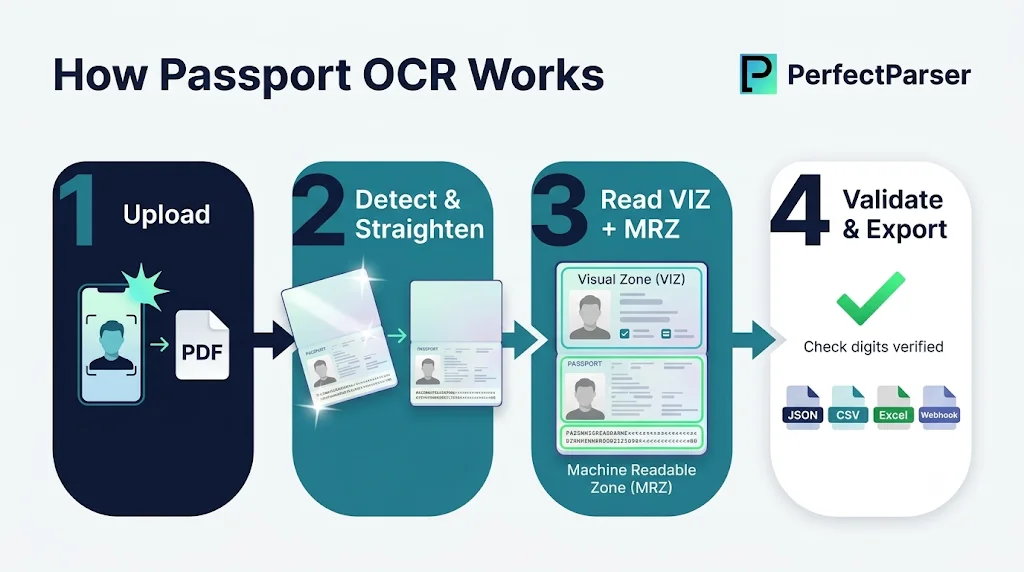
How AI Extracts Data from a Passport, Step by Step
If you want to extract data from a passport automatically, this is what happens between upload and output. Understanding the steps helps you judge any passport data extractor you evaluate.
Step 1: Capture and ingestion
The document arrives as a scan, a PDF, or a photo. Real-world inputs include flatbed scans, phone camera images, screenshots, and multi-page PDFs where the passport is one page among others. A good system accepts all of these without asking users to re-shoot.
Step 2: Page detection and geometry correction
The AI first has to find the passport page in the image. Customers do not align documents neatly. The photo may include a table, a thumb, a keyboard, or the other half of an open passport. Vision models locate the data page, then correct for rotation, skew, and perspective distortion so that text lines run straight.
This is the step that separates AI-based extraction from older template matching. Template systems assume the document sits in a known position. Vision models do not.
Step 3: Image quality handling
Phone photos bring problems that scanners do not:
- Glare from the laminate that washes out characters
- Shadows from the photographer’s hand or phone
- Blur from low light and slow shutters
- Low resolution when images are compressed by messaging apps
Multimodal AI vision is trained on this kind of imperfect input. Rather than rejecting a photo outright, it reads what is legible and flags what is not.
Step 4: Zone segmentation
The system separates the data page into regions: photo, VIZ text blocks, and the two MRZ lines. Each region is handled with the approach best suited to it. The MRZ, for example, benefits from rules built around its fixed character grid, while VIZ fields benefit from layout understanding and language-aware reading.
Step 5: Text recognition
Characters are read from both zones. In the MRZ, the model knows the alphabet is limited to uppercase letters, digits, and <, which makes it far easier to resolve ambiguous glyphs. In the VIZ, the system reads labels and values and pairs them, even when labels appear in several languages.
Step 6: Field parsing and normalisation
Raw text becomes fields. Dates are converted to a consistent format (for example, 1974-08-12 rather than 740812). Country codes are standardised. Names are split into surname and given names. This is the step that makes output usable by a database instead of a human.
Step 7: Validation and cross-checking
The parser recalculates the MRZ check digits and compares them to the printed ones. It can also compare VIZ values to their MRZ counterparts. Mismatches are flagged rather than silently accepted. We cover this in detail next.
Step 8: Structured output
The result is delivered in the format you need: JSON for applications, CSV or Excel for operations teams, or a webhook payload that pushes data into your own systems automatically.
How MRZ Check Digits Work (With a Real Worked Example)
The check digit mechanism is the single most useful feature of the MRZ for automated reading, and it is easy to understand once you see it done.
The ICAO specimen passport (a fictional document used in the standard itself) has this MRZ:
P<UTOERIKSSON<<ANNA<MARIA<<<<<<<<<<<<<<<<<<<
L898902C36UTO7408122F1204159ZE184226B<<<<<10
Line 2 breaks down like this:
L898902C3is the passport number6is the check digit for the passport numberUTOis the nationality740812is the date of birth (12 August 1974)2is the check digit for the date of birthFis the sex120415is the date of expiry (15 April 2012)9is the check digit for the date of expiryZE184226B<<<<<is the optional personal number field- The final two digits are the personal number check digit and the composite check digit
The calculation
Each character is converted to a value:
- Digits keep their value (0 to 9)
- Letters A to Z become 10 to 35
- The filler
<counts as 0
Each value is multiplied by a repeating weight of 7, 3, 1, the products are added up, and the result is divided by 10. The remainder is the check digit.
Passport number L898902C3:
The sum is 316. Dividing by 10 leaves a remainder of 6, which matches the printed check digit.
Date of birth 740812: (7×7) + (4×3) + (0×1) + (8×7) + (1×3) + (2×1) = 49 + 12 + 0 + 56 + 3 + 2 = 122. The remainder is 2, which matches.
Date of expiry 120415: (1×7) + (2×3) + (0×1) + (4×7) + (1×3) + (5×1) = 7 + 6 + 0 + 28 + 3 + 5 = 49. The remainder is 9, which matches.
Why this matters for OCR
If an OCR engine misreads a single character in the passport number, say an 8 as a B, the recalculated check digit will almost certainly fail to match. That gives the system an objective signal that the read is wrong, so it can retry, apply alternate interpretations, or flag the record for human review.
This is the difference between “the OCR returned text” and “the OCR returned text that passed a mathematical test.” For any workflow where a typo in a passport number causes a rejected booking, a failed onboarding, or a compliance headache, that difference is significant.
There is also a composite check digit at the end of line 2 that covers the passport number, date of birth, date of expiry, and optional data fields together, giving a final integrity test across the line.
Common MRZ reading pitfalls
Because the MRZ uses a limited alphabet, certain confusions are common in raw OCR:
- O and 0 (letter O vs zero)
- I and 1
- B and 8
- S and 5
- Z and 2
In a numeric position such as a date, the system can safely treat an O as a 0. In an alphabetic position such as the country code, the reverse applies. Position-aware parsing is what makes MRZ reading dependable, and check digits confirm the outcome.
Handling Real-World Images: Glare, Skew, and Low Resolution
Test conditions are easy. Production conditions are not. A passport parser earns its keep on the images people actually submit.
Laminate glare. Data pages are covered in a reflective film. A photo taken under a ceiling light or window can leave a bright streak across the very fields you need. Multimodal vision models learn to read around partial reflections, and the MRZ often remains legible even when part of the VIZ is washed out. Because the same identity data appears in both zones, a legible MRZ can recover a field that glare has damaged in the VIZ.
Skewed and tilted pages. People hold phones at angles. Perspective distortion makes text lines converge and characters stretch. Geometry correction straightens the page before recognition.
Low-resolution mobile photos. Images forwarded through chat apps are often compressed. AI reading models can reconstruct likely characters from context, and the MRZ’s constrained alphabet helps further.
Cluttered backgrounds and partial crops. Passports photographed on patterned surfaces, or with a finger over a corner, still need to be located and read.
Multi-page PDFs and batches. Operations teams rarely upload one document at a time. Batch processing lets you submit a folder of files and receive consistent output for each, which is what turns OCR from a demo into a workflow.
The honest framing is this: no OCR system can read text that is not in the image. If a photo is so blurred or cropped that characters are genuinely missing, the right behaviour is to flag the field as low-confidence or unreadable, not to guess. A good extractor surfaces that uncertainty so your process can ask for a better image.
Passport Data Extractor Architecture: What Sits Under the Hood
If you are evaluating a passport data extractor, or deciding whether to build one, it helps to understand the layers involved.
1. Vision and layout model. A multimodal model that understands the page as an image and as a document. It finds zones, reads text, and pairs labels with values.
2. MRZ specialist logic. Deterministic rules based on the ICAO 9303 TD3 layout: fixed field positions, character-set constraints, and check digit validation.
3. Normalisation layer. Converts dates, country codes, and names into consistent formats regardless of the issuing country.
4. Validation and confidence layer. Cross-checks the VIZ against the MRZ, tests check digits, and assigns confidence so low-quality reads can be routed to review.
5. Output and delivery layer. Exports to JSON, CSV, or Excel, or sends results to your systems via webhook.
Building all five layers in-house is feasible, but the long tail is where the effort lives: new passport designs, reissued series, unusual fonts, and the steady stream of bad photos. Buying a managed extractor means that long tail is someone else’s maintenance problem. This is why many travel tech and fintech teams choose to integrate rather than build.
Using a Passport Extraction API: Developer and Webhook Workflows
For engineering teams, a passport extraction API is the practical way to embed this capability in an application. The typical integration pattern is simple.
Synchronous request. Your app sends an image or PDF and receives structured output in the response. This suits interactive flows such as a check-in screen or an onboarding form that pre-fills after the customer uploads a photo.
Batch submission. For back-office volumes, you submit many documents and collect results when processing completes. This fits visa intake queues, agency uploads, and nightly processing jobs.
Webhooks. Instead of polling, your system receives a callback with extracted data as soon as a document is processed. Webhooks are well suited to event-driven architectures where extraction feeds a CRM, a property management system, or a compliance queue.
File exports. Not every team wants an API. Operations staff often prefer a downloadable CSV or Excel file they can open immediately, with one row per passport and one column per field.
An illustrative JSON response looks like this:
{
  "document_type": "P",
  "issuing_country": "UTO",
  "surname": "ERIKSSON",
  "given_names": "ANNA MARIA",
  "passport_number": "L898902C3",
  "nationality": "UTO",
  "date_of_birth": "1974-08-12",
  "sex": "F",
  "date_of_expiry": "2012-04-15",
  "mrz_line_1": "P<UTOERIKSSON<<ANNA<MARIA<<<<<<<<<<<<<<<<<<<",
  "mrz_line_2": "L898902C36UTO7408122F1204159ZE184226B<<<<<10",
  "check_digits_valid": true
}
Treat this as a representative shape rather than a guaranteed schema. The principle is what matters: consistent keys, normalised dates, raw MRZ strings preserved for auditing, and a validation signal your application can act on.
Design tips for integration:
- Store the raw MRZ lines alongside parsed fields so you can re-validate later.
- Use the check digit result to branch your logic: auto-accept on pass, route to review on fail.
- Compare expiry dates against your own business rules, such as requiring six months of validity for travel.
- Keep an audit trail of the source image and the extracted output.
- Minimise retention of identity images according to your privacy obligations.
Where Passport OCR Delivers Value
Travel and hospitality
Airlines, hotels, and tour operators collect passport details for bookings, advance passenger data, and guest registration. Automated extraction replaces front-desk typing, shortens check-in queues, and reduces the transcription errors that cause problems later. A passenger who photographs their passport on a phone can have their details pre-filled before they reach the counter.
Visa and immigration processing
Agencies and consultancies handle large volumes of applicant documents. Extracting holder fields and expiry dates in bulk lets teams sort, triage, and pre-populate forms quickly, so staff spend time on exceptions rather than data entry.
Cross-border fintech and onboarding
Financial platforms that onboard international customers need identity data captured accurately. Passport OCR turns the first step of onboarding from a manual form into a photo upload, improving completion rates while giving compliance teams clean, structured records as part of a broader KYC document extraction pipeline.
Corporate travel and HR mobility
Relocation teams and corporate travel managers collect passports for employees and dependents. A parser consolidates that data into a spreadsheet with expiry tracking, so renewals can be planned before they become problems.
What Passport OCR Does Not Do (Boundaries You Should Know)
A trustworthy guide tells you where a technology ends. Passport OCR reads what is printed on the page. It is a data extraction tool, not a complete identity verification system. Specifically:
- It does not read the electronic chip. Most modern passports contain an RFID e-Passport chip with digitally signed data. Reading it requires NFC hardware and cryptographic verification, which is a separate technology from optical character recognition. PerfectParser works from images and does not read RFID chips.
- It does not check government databases. OCR can tell you what a passport says. It cannot tell you whether the issuing authority considers the document valid, lost, stolen, or revoked. PerfectParser does not perform government passport database validity checks.
- It does not perform facial liveness matching. Confirming that the person presenting a passport is the person pictured, and that they are physically present, requires biometric face matching and liveness detection. PerfectParser does not provide those functions.
- It does not run check-digit validation or auto-flag mismatches. PerfectParser extracts the visual-zone fields and raw MRZ lines as text so your own application or KYC workflow can run check-digit verification and compare VIZ vs. MRZ values.
Why spell this out? Because teams sometimes assume “passport OCR” means “passport verification.” It does not. The accurate way to think about it is as the data capture layer. If your compliance requirements demand chip authentication, database checks, or biometric matching, pair extraction with specialised tools for those steps. Extraction still saves significant time in that stack, because clean structured data feeds every later check.
How to Choose a Passport OCR Solution: A Practical Checklist
Whether you are comparing a passport parser, a passport extraction API, or an in-house build, test against these criteria:
- Country coverage. Does it handle passports from 190+ countries without per-country configuration?
- Both zones. Does it read the VIZ and the two-line TD3 MRZ, and can you see both?
- Check digit validation. Does it verify MRZ check digits and report the result?
- Image tolerance. Test it with your worst photos: glare, tilt, shadows, and low resolution.
- Field completeness. Does it return the fields you actually need, including place of birth and issue date where present?
- Output formats. JSON, CSV, Excel, and webhooks, so both developers and operations teams are served.
- Batch handling. Can you process hundreds of files in one go?
- Confidence signalling. Does it tell you when it is unsure instead of guessing?
- Honest boundaries. Does the vendor clearly state what it does not do?
- Data handling. Are retention and privacy practices clear, given the sensitivity of identity documents?
The best way to evaluate is to run a real sample. Use fifty of your own passport images, including the ugly ones, and compare the output to the source.
Best Practices for Higher Accuracy
Even the strongest AI benefits from good inputs. If you control the capture experience, these habits improve results:
- Capture the whole data page. Include the MRZ at the bottom and avoid cropping edges.
- Use even lighting. Avoid direct overhead light that creates glare on the laminate.
- Keep the camera steady and parallel. Reduce blur and perspective distortion.
- Provide on-screen guidance. A simple frame overlay in your app reduces bad captures.
- Prefer original files over screenshots. Re-compression degrades small characters.
- Validate on your side too. Check expiry dates and required validity windows in your own logic.
- Route low-confidence results to review. A human glance at a flagged field is cheaper than a downstream error.
Privacy and Compliance Considerations
Passports contain sensitive personal data. Any workflow that processes them should be designed with privacy in mind. Practical points include collecting only the data you need, defining how long images and extracted fields are retained, restricting access to authorised staff, and understanding the data protection rules that apply in the jurisdictions you serve, such as GDPR in Europe. Check your provider’s documentation for how files are handled, and involve your legal or compliance team when designing the process.
Conclusion: Turn Passport Images into Structured Data
Passports hold their data in two places, and a good passport OCR system reads both. The visual inspection zone gives you the human-readable details, while the MRZ gives you a standardised, check-digit-protected record that lets software prove its own accuracy. When AI vision handles the messy reality of mobile photos, glare, and tilted pages, and parsing logic handles the standard, you get what manual entry never delivered: speed, consistency, and fewer errors.
If you are processing international passports at any meaningful volume, automating extraction is one of the highest-return changes you can make.
Extract Passport Holder Fields & MRZ Lines in Seconds
Upload a sample batch of passport scans or mobile photos across 190+ countries and export clean holder fields, expiry dates, and raw MRZ strings to JSON, CSV, Excel, or webhooks. Start with 20 free credits.
Try Passport OCR Free →