
An insurance policy schedule parser is software that reads a multi-page policy document, finds the schedule tables, and returns coverage limits, deductibles, and endorsements as structured data, with no re-keying. This guide explains how it works, shows a worked example, covers the errors to watch for, and gives you a way to test one on your own policies. It is written for commercial lines underwriters, surplus lines brokers, risk analysts, and coverage audit specialists.
A policy schedule states what is covered, for how much, and subject to what deductible. In a multi-page commercial policy, those terms are spread across tables, footnotes, and endorsements. An AI insurance policy schedule parser reads those pages and rebuilds the tables. It separates per-occurrence limits from aggregates, captures deductible and retention structures, and links endorsements to the terms they change. It exports clean JSON or Excel, so nobody re-keys the data. It does not decide whether to quote or bind a risk.
The Re-Keying Problem Behind Every Policy Booklet
Ask any underwriter, broker, or coverage auditor what slows them down, and the answer is rarely judgment. It is the reading. A commercial policy arrives as a PDF of fifty, eighty, or two hundred pages. Somewhere in it are the numbers that matter: limits, sub-limits, deductibles, retentions, named perils, and the endorsements that quietly rewrite all of the above.
Someone has to find those values and type them into a spreadsheet, a comparison, or an agency management system. That is slow, and it invites transcription errors that surface later, at renewal, in a coverage dispute, or during an audit.
An insurance policy schedule data extractor is built to remove that step. Instead of a person scanning pages and retyping figures, the software reads the document, identifies the schedule tables, and returns structured fields. For commercial brokerages checking newly issued policies against client proposals, pairing schedule parsing with automated binder review flags coverage discrepancies before policy delivery. The sections below cover how that works in practice, where the hard parts are, and what a parser should and should not be expected to do.
What Is Actually in a Policy Schedule
The schedule turns general coverage language into specific terms. Depending on the line of business, it usually includes:
- Named insured, policy period, and policy number in the declarations.
- Coverage parts such as property, general liability, auto, or inland marine.
- Limits of insurance, often split into per-occurrence, per-claim, and aggregate amounts.
- Sub-limits for specific exposures such as flood, earthquake, or named storm.
- Deductibles and retentions, which may vary by peril, location, or coverage part.
- Schedules of locations, vehicles, or equipment, each with its own values.
- A list of forms and endorsements attached to the policy, referencing ACORD or ISO standardized schedules.
The difficulty is that none of this appears in one place. A headline limit may sit on the declarations page while the sub-limits that restrict it are in a separate table, and an endorsement forty pages later may override both.
Why Policy Schedules Break Traditional Extraction
Older extraction tools treated a policy like any other document: convert the page to text, then look for keywords. That approach struggles with insurance schedules for four reasons:
- Tables span pages: A property schedule can run across a dozen pages, with headers that appear once, repeat inconsistently, or disappear. A tool that reads page by page loses the column meaning halfway through.
- Layouts vary by carrier: The same concept, such as a wind or hail deductible, appears under different labels and in different positions depending on who issued the policy.
- Meaning depends on context: The number "$1,000,000" is useless until you know whether it is per occurrence, an annual aggregate, or a sub-limit for a single peril.
- Scans and low-quality PDFs add noise: Policies are often faxed, photographed, or flattened, which degrades text recognition.
Manual Entry vs. Template OCR vs. AI Schedule Parser
How an AI Parser Reads a Policy: The Vision Architecture
Insurance policy OCR is the first step in the pipeline, not the whole job. A typical process has five stages:
- Document ingestion and classification: The parser accepts PDFs, scans, and images, then identifies what each page is: declarations, schedule, form, or endorsement. Classifying pages first lets the system apply the right extraction logic to each.
- Text recognition: OCR converts image-based pages into machine-readable text and preserves where each word sits on the page. Position matters because tables are defined by alignment, not just by words.
- Layout and structure analysis: A vision model interprets the page the way a person would: it identifies headers, table boundaries, rows, columns, merged cells, and footnotes. This step is what separates a parser from simple OCR, which would return a stream of text with the table structure lost.
- Field mapping with insurance logic: The system maps recognized content to defined fields such as per-occurrence limit, annual aggregate, deductible type, and peril. This is where domain knowledge matters, because the same number means different things in different columns.
- Validation and output: Extracted values are checked for consistency, flagged when something looks wrong, and exported in a structured format.
Each stage can fail on its own, which is why a good parser reports where it is uncertain rather than returning a clean-looking guess.
Table Parsing Across Multi-Page Schedules
Insurance policy schedule OCR succeeds or fails on table handling. Four capabilities separate usable tools from frustrating ones:
- Continuation across pages: When a table runs onto the next page, the parser needs to recognize it is the same table, carry the column headers forward, and keep the rows in order. Without that, the first page is correct and every later page is mislabeled.
- Merged and nested cells: Schedules often group rows under a location or coverage heading. The parser needs to attach each row to its parent group so a deductible is tied to the right location or peril.
- Footnotes and conditions: Terms such as "subject to a minimum deductible of $25,000" often sit in a footnote or a small-print line below the table. If the parser ignores them, the extracted deductible is incomplete.
- Tolerance for layout variation: Rather than relying on a fixed template per carrier, the parser should read structure from the page itself, so a new carrier format doesn’t require a rebuild.
PerfectParser is designed for multi-page table extraction from dense policy schedules, returning rows and columns with their relationships intact.
How to Extract Coverage Limits From a Policy
When you need to extract coverage limits from a policy, the label on the number is as important as the number. A reliable parser separates limit types instead of collapsing them into one field.
A flat extraction that returns "Limit: $2,000,000" hides all of this. A structured extraction returns a limit type, an amount, the coverage it applies to, and the source page, so a reviewer can verify it in seconds. It also makes comparisons honest: a $1M per-occurrence and $2M aggregate policy is not the same as a $2M per-occurrence policy, and the data should show that.
How to Extract Deductibles From a Policy
Anyone who has had to extract deductibles from a policy knows they are rarely a single number. A schedule may contain several structures:
Capturing these correctly means extracting the amount, the type, the basis it applies to, the peril or coverage it belongs to, and any conditions. A parser that returns only "Deductible: 2%" leaves the reader to hunt for what the 2% is applied to. A parser that returns the percentage, the valuation basis, the applicable perils, and the stated minimum gives a complete, usable record. Extracting precise percentage and per-peril retentions is also essential for downstream claims teams using insurance claim OCR to calculate net claim totals from repair estimates.
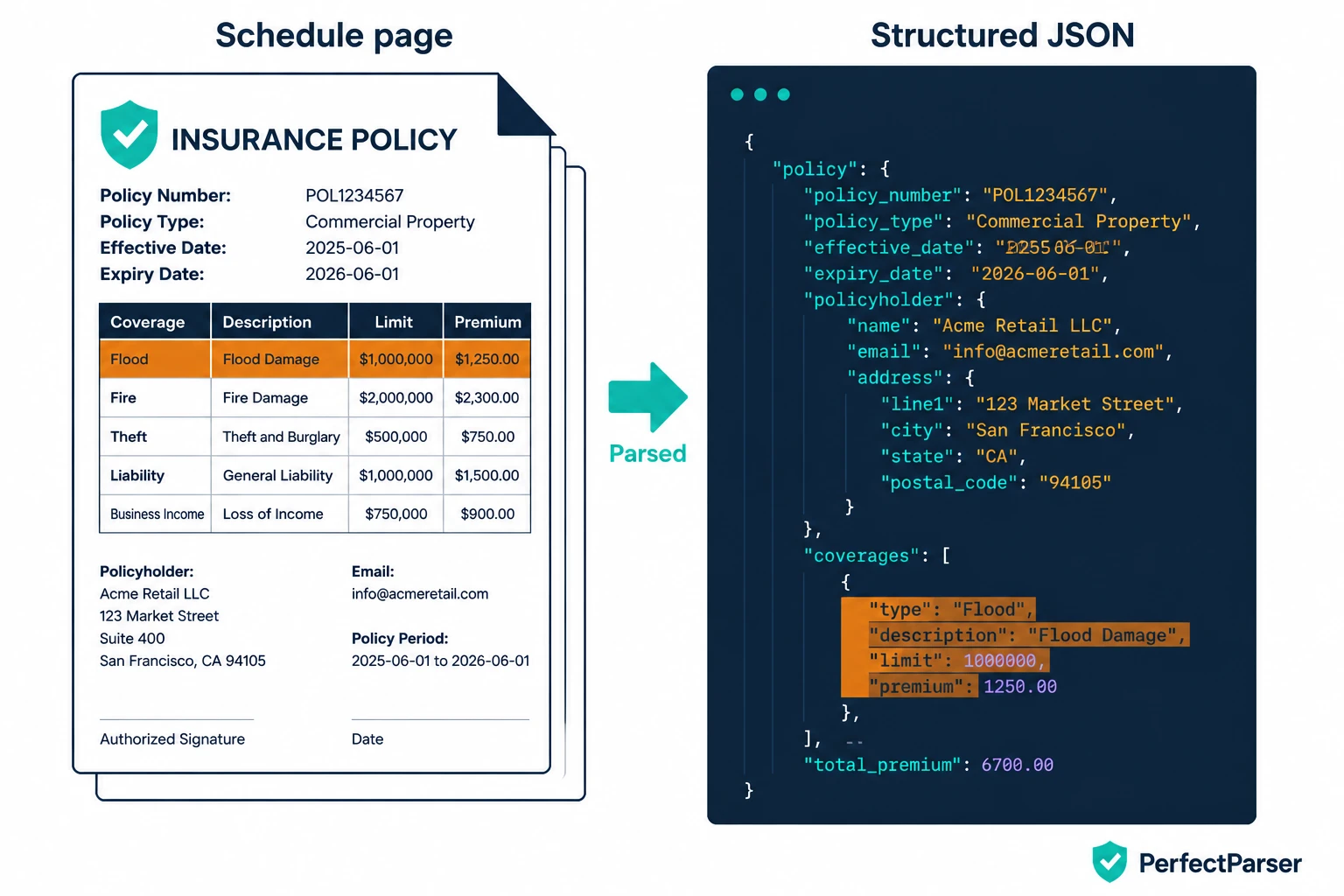
Worked Example: From Schedule Page to Structured JSON
The data below is fictional and for illustration only. A simplified property schedule page might read:
Endorsement 4 (page 41): Flood sub-limit at Location 3 is reduced to $750,000.
A parser should return something like this:
{
  "coverage": "Flood",
  "limit": {
    "type": "sub-limit",
    "basis": "annual aggregate",
    "amount": 1000000
  },
  "deductible": {
    "type": "flat",
    "basis": "per occurrence",
    "amount": 50000
  },
  "source_page": 12,
  "linked_endorsement": {
    "id": "Endorsement 4",
    "source_page": 41,
    "change": "Sub-limit reduced to 750000 at Location 3",
    "applies_to": "Location 3"
  },
  "review_flag": true,
  "review_reason": "Endorsement modifies this term; verify effective limit per location"
}
Notice what a flat "Flood: $1,000,000" would have lost. The limit has a type and a basis. The deductible has a structure. The endorsement is linked rather than ignored. And the field is flagged because the base schedule and an endorsement disagree.
Endorsements: Where Coverage Quietly Changes
Endorsements are where most extraction errors turn into real problems. They modify the base policy, often in a different section from the terms they change. An endorsement might increase a sub-limit, add an exclusion, change a deductible for a specific peril, or add an additional insured.
For a schedule parser, the goals are to:
- Identify every endorsement attached to the policy, usually from the forms list and the endorsement pages themselves.
- Capture form number, edition date, and title so each can be referenced and verified.
- Extract the specific changes where the endorsement states new limits, deductibles, or conditions.
- Link each change to the term it modifies, so the extracted data reflects the coverage as endorsed rather than only as originally written.
This last step is the hardest and the most valuable. An extraction that shows the base limit but not the endorsement that reduced it is accurate on paper and wrong in practice. Where a link can’t be made with confidence, the right behavior is to flag the field for review rather than choose silently.
Common Extraction Errors and How a Parser Should Handle Them
Parsing Multi-Location Schedules of Values (SOVs)
Property programs often include a Schedule of Values listing every location, sometimes hundreds. Each row typically carries an address, construction type, occupancy, year built, and insured values for building, contents, and business income, plus a total insured value.
SOV extraction is a row-level task. The parser needs to:
- Read each row as a complete record with all its fields.
- Keep every value tied to its location, so a value never drifts to the wrong row.
- Handle SOVs that arrive as PDFs, scans, or spreadsheets with inconsistent column names.
- Keep totals separate from line items, so a summary row is not counted as a location.
When the SOV and the policy schedule are processed together, location-level deductibles and sub-limits can be matched to the right sites. Furthermore, when SOVs are submitted alongside vendor coverage documentation, automated ACORD form data extraction verifies that certificate limits match property schedules. That removes a large amount of manual cross-referencing from property reviews and renewal comparisons.
Exporting Policy Schedule Data to JSON, Excel, AMS360, and Applied Epic
Extraction only helps if the output fits the way you work. PerfectParser exports structured data as JSON for systems and pipelines, and as Excel for people who want to filter, compare, and annotate. Each record keeps its source reference so a reviewer can jump back to the page.
For agencies and brokerages, exports are structured for import into agency systems, including AMS360 and Applied Epic, via CSV/Excel mapping or API integration, so coverage data can flow into the system of record instead of being retyped into it.
A useful output has four traits:
- Consistent field names across carriers, so documents are comparable.
- Limit and deductible types as separate labeled fields.
- A source page reference for every value.
- A confidence or review flag on uncertain fields.
Validating Extracted Limits and Deductibles (and Where Humans Step In)
No parser is right every time, and a trustworthy one doesn’t pretend to be. The practical safeguard is validation plus targeted review.
Validation can include checks such as whether a per-occurrence limit exceeds its aggregate, whether a deductible has a recognized type, whether totals reconcile with line items, and whether required fields are present. Failures and low-confidence values are routed to a reviewer with the source page attached.
This keeps people on the decisions that need judgment and takes them off the retyping. The workflow is faster than manual entry without removing accountability for the final data.
What a Schedule Parser Does Not Do
PerfectParser extracts and structures what a policy document says. It is not an underwriting risk-scoring engine, and it does not decide whether to bind or quote coverage. It also does not perform claims fraud investigation.
Those decisions stay with the underwriters, brokers, and analysts using the extracted data. A parser gives them cleaner, faster inputs. It does not replace their judgment about the risk.
How to Test an Insurance Policy Schedule Parser on Your Own Policies
Accuracy varies with document quality and layout, so test any tool on your own documents rather than a clean demo file:
- Build a verified answer key: Choose 10 to 20 policies across carriers, including scans and long schedules, and have an expert verify every target field by hand.
- Score by field type, not overall: Report accuracy separately for limits, deductibles, endorsements, and SOV rows. A single blended number hides weak spots.
- Count errors by cost: A wrong aggregate matters more than a wrong form title. Weight errors accordingly.
- Check the flags: Measure how many errors were flagged for review versus returned silently. Silent errors are the dangerous ones.
- Time the review: Record how long a reviewer takes to verify flagged fields against source pages.
- Retest on new formats: Run a carrier you haven’t tested before to verify layout generalization.
Along the way, confirm the basics: page-spanning tables stay aligned, limits keep their types, and endorsements link back to their parent terms.
Choosing an Insurance Policy Schedule Parser
Policy schedules hold the terms that decide what a policy actually covers, and getting them out of multi-page PDFs has been manual for too long. An AI parser built for insurance reads layout and tables as well as text. It labels limits and deductibles correctly, connects endorsements to the terms they change, and delivers structured data you can verify. The result is less re-keying, fewer transcription errors, and more time for the analysis only your team can do.
Extract Policy Schedules, Limits & Endorsements Automatically
Stop re-keying multi-page policy booklets and Schedules of Values. Extract per-occurrence limits, aggregate caps, deductibles, and endorsement overrides into clean Excel, CSV, or JSON. 20 free pages included.
Parse Your Policy Schedules Free →