
Quick answer: An MRZ passport parser reads the fixed-format OCR-B lines defined by ICAO Doc 9303—TD3 (
2 × 44) on passports, TD1 (3 × 30) on national ID cards, and TD2 (2 × 36) on travel permits—using perspective rectification, glare handling, position-aware character constraints, and modulo-10 check digit repair. Passing checksums confirm internal data consistency, while chip reading and document authenticity remain separate layers.
An MRZ passport parser—often built into an id card and passport parser—turns the two lines of <<< characters at the bottom of a passport into clean, validated identity fields. On a flatbed scanner that is easy. On a phone photo taken under a ceiling light, with a glossy laminate, a hologram over the text and a tilted camera, it is one of the hardest small-text OCR problems in identity verification.
This guide explains how the MRZ is structured, why basic OCR fails on real-world captures, and how an AI-based parser recovers accurate data from glare, skew and holograms. It is written for engineers and architects who need the details.
What Is an MRZ on a Passport?
The machine readable zone (MRZ) is the block of text at the bottom of the identity page of a machine readable passport. It exists so that machines can read identity data without interpreting layouts, languages or decorative fonts. The standard behind it is ICAO Document 9303, published by the International Civil Aviation Organization, and it applies to passports, ID cards and some visas worldwide.
Two design decisions make the MRZ machine-friendly:
- A restricted alphabet. Only uppercase A–Z, digits 0–9 and the filler character
<are allowed. There are no accents, lowercase letters or punctuation. - A fixed layout. Every field lives at known character positions, padded with
<so lines always reach the required length.
The text is printed in the OCR-B typeface. It was designed to be legible to optical readers, but “OCR-friendly” does not mean “trivial for any OCR model,” especially on a photo from a mobile camera.
Machine Readable Passport Formats: TD1, TD2 and TD3
Different document types use different MRZ sizes. A parser must detect which one it is looking at before it can slice fields correctly.
Passport booklets are almost always TD3. National ID cards most often use TD1, while TD2 appears on some ID-size documents. Visa stickers have their own MRV formats, so a single “two-line MRZ” assumption will misread them.
Because the formats differ in line count and line length, a robust MRZ passport parser classifies the format first (count lines, measure characters per line) and then applies the matching field map.
MRZ Code Anatomy: Reading a TD3 Passport
Here is the public ICAO specimen passport MRZ, which uses the fictional country code UTO:
P<UTOERIKSSON<<ANNA<MARIA<<<<<<<<<<<<<<<<<<<
L898902C36UTO7408122F1204159ZE184226B<<<<<10
Line 1: document and name
Names follow one rule. A double << separates the surname from the given names, a single < replaces each space inside a name, and every unused position is padded with <. Never treat < as noise, because it carries structure.
Line 2: the data fields and check digits
Once the zone is isolated and the lines are read correctly, parsing is substring extraction plus normalization. All the difficulty sits in getting a clean read from the image.
TD1 and TD2 field maps
For national ID cards, the same logic applies with different positions.
TD1 (3 lines × 30):
- Line 1: document type (1–2), issuer (3–5), document number (6–14), check digit (15), optional data (16–30)
- Line 2: date of birth (1–6), check digit (7), sex (8), expiry date (9–14), check digit (15), nationality (16–18), optional data (19–29), composite check digit (30)
- Line 3: names (1–30)
TD2 (2 lines × 36):
- Line 1: document type (1–2), issuer (3–5), names (6–36)
- Line 2: document number (1–9), check digit (10), nationality (11–13), date of birth (14–19), check digit (20), sex (21), expiry date (22–27), check digit (28), optional data (29–35), composite check digit (36)
A good parser stores these maps as data, not as hard-coded logic, so adding a new format is a configuration change.
MRZ Check Digit Verification, Step by Step
The check digit is the most useful feature of the MRZ for a developer. It is a single character that lets you test whether the characters you extracted for a field are internally consistent.
The algorithm
- Convert each character to a number: digits keep their value, letters A–Z map to 10–35, and the filler
<equals 0. - Multiply the values by the repeating weights 7, 3, 1.
- Add the products together.
- Take the sum modulo 10.
- Compare the result with the printed check digit.
A worked example
Using the specimen passport number L898902C3:
The sum is 316, and 316 mod 10 = 6, which matches the printed check digit.
The same method on the date of birth 740812 gives 122, so the check digit is 2. The expiry date 120415 gives 49, so the check digit is 9.
The composite digit
The final character on a TD3 passport is a composite check digit. It covers the passport number and its check digit, the date of birth and its check digit, and the expiry date, its check digit, the optional data and that field’s check digit. One digit therefore validates most of line 2 at once.
A minimal implementation
def mrz_check_digit(field: str) -> int:
    weights = (7, 3, 1)
    total = 0
    for i, ch in enumerate(field):
        if ch.isdigit():
            value = int(ch)
        elif ch == "<":
            value = 0
        else:
            value = ord(ch) - ord("A") + 10
        total += value * weights[i % 3]
    return total % 10

assert mrz_check_digit("L898902C3") == 6
assert mrz_check_digit("740812") == 2
assert mrz_check_digit("120415") == 9
What the check digit does not prove
A valid check digit means the characters agree with each other. It does not prove the passport is genuine, unaltered or issued by the claimed authority. Someone who forges a document can calculate correct check digits. Treat MRZ check digit verification as a data-quality control, not an authenticity control.
Why Basic OCR Fails on Real Passport Photos
Generic OCR engines are built for paragraphs of mixed text. The MRZ is dense, uses a specialized font, contains long runs of < and has no spaces or context to help a language model guess. On phone captures, these conditions break it:
- Glare on laminate. Overhead lights create bright streaks across the lower page, washing out contrast on a few characters.
- Holograms and security overlays. Reflective patterns and fine-line backgrounds sit over or near the zone and interfere with segmentation.
- Skew and perspective. A tilted or curved page turns straight lines into diagonals and shrinks characters unevenly.
- Blur and low resolution. MRZ characters are small and tightly spaced, so slight motion blur merges similar shapes.
- Cropping. Users often clip the bottom of the page, which is exactly where the MRZ is.
- Look-alike glyphs. O and 0, I and 1, B and 8, S and 5, Z and 2 are the classic confusions, and they land in document numbers and dates.
A single misread character can propagate into a customer record, a failed checksum, or worse, a plausible but wrong value that slips through.
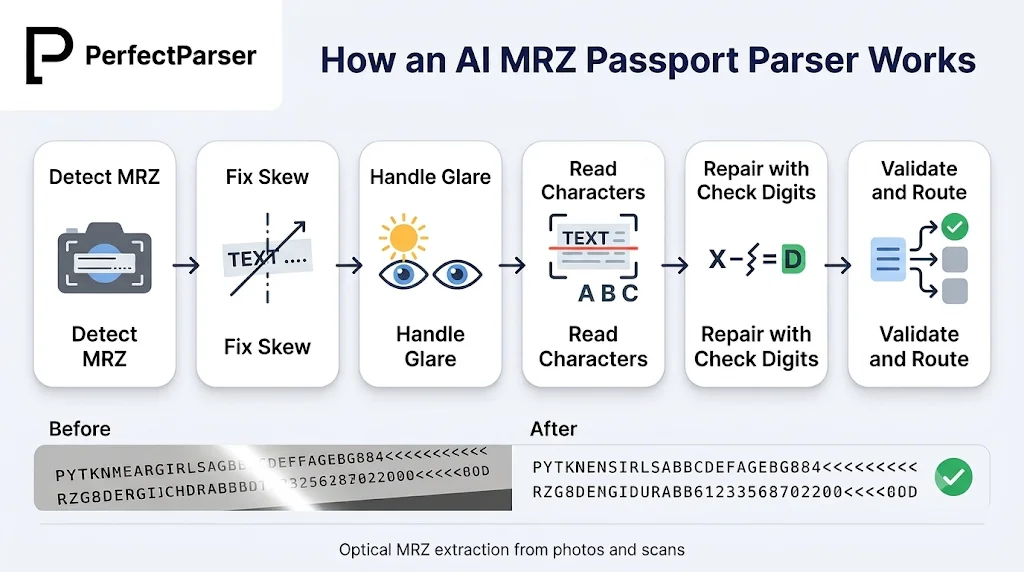
How an AI MRZ Passport Parser Works
A production pipeline treats the MRZ as a structured data problem and not as a text-recognition problem. Each stage reduces uncertainty for the next.
1. Detect and localize the MRZ
The model first finds the zone. Because ICAO fixes the zone’s position at the bottom of the identity page, detection can search a narrow region, which cuts false positives from decorative text and multilingual fields. The detector must work when the page is tilted, partially shadowed or surrounded by background clutter.
2. Rectify perspective and skew
Once the zone is found, the pipeline corrects geometry. Two techniques do most of the work:
- Baseline angle estimation. The text lines of the MRZ are long, straight and parallel. Measuring their angle gives a reliable rotation estimate that does not depend on the rest of the page.
- Perspective (four-point) correction. Using the corners of the zone or document, the image is warped to a flat, fronto-parallel view so that character size and spacing become uniform.
Rectifying first means the recognition model sees consistent geometry instead of having to learn every possible camera angle.
3. Handle glare and holograms
Glare is not random noise. It saturates pixels, which makes it detectable. An AI parser typically:
- Identifies specular regions by finding blown-out or low-contrast areas near the zone.
- Normalizes local contrast so characters under mild reflection remain separable without amplifying noise.
- Separates character strokes from overlay patterns, so a hologram’s fine lines are not read as part of a glyph.
- Marks affected characters as low-confidence instead of silently guessing them.
The last point is important. The goal is not to pretend glare is absent. The goal is to know which characters were compromised so later stages can treat them carefully.
4. Segment lines and recognize OCR-B characters
With a clean, flat zone, the pipeline splits the image into lines and then into characters using the known grid. Because TD3 lines have exactly 44 characters and TD1 lines have exactly 30, the expected character count gives a strong check on segmentation. If a line yields 43 or 45 characters, something went wrong, and the system can retry. Recognition itself uses a model trained for the OCR-B typeface and the 37-symbol alphabet, so it never has to consider characters that cannot appear.
5. Apply position-aware character constraints
This stage separates an AI MRZ parser from generic OCR. Each position in the MRZ has a known type:
- Dates and check digits can only be digits.
- Country codes can only be letters.
- The sex field can only be M, F or the filler.
- Names can only contain letters and
<.
If the recognizer returns a letter O in a date field, the constraint layer maps it to 0. A 5 in a country code becomes S. These are corrections the structure justifies, not guesses.
6. Repair errors with checksums
When a checksum fails, the pipeline does not simply reject the read. It uses the failed check digit as a search guide:
- Identify which field failed.
- Find the low-confidence characters inside that field.
- Try plausible substitutions (for example O↔0, I↔1, B↔8) in those positions only.
- Accept a candidate only if the check digit now passes and the character-class rules still hold.
Because only a handful of candidates exist, this search is fast. It can recover reads that look hopeless to a plain OCR engine, while still refusing to “fix” anything the checksum cannot confirm.
7. Validate, score and route
The final stage runs the full set of rules: line lengths, allowed characters, check digits including the composite, plausible dates and format consistency. It then produces a decision:
- Accept: all checks pass with good confidence.
- Retry: capture quality was the problem (heavy glare, truncated crop), so the client should prompt a recapture.
- Escalate: the data is readable but something is inconsistent, so route it to review or a stronger verification step.
Edge Cases a Good MRZ Reader Handles
These details tend to be missing from basic tutorials, and each one causes real production bugs.
- Two-digit years. Dates are YYMMDD with no century. Expiry dates are normally interpreted as 20xx, while birth dates need a rule such as “choose the century that makes the age plausible and not in the future.”
- Long names. Names are truncated to fit the 39-character name field, so the MRZ name can be shorter than the printed name.
- Transliteration. Accented and non-Latin characters are converted to the allowed alphabet according to issuing-state rules, so the MRZ spelling can differ from the visual zone.
- Long document numbers. When a document number exceeds the nine-character field, the overflow moves into the optional data area on some formats.
- Sex field values. Besides M and F, the field can hold X or the filler for unspecified.
- Mixed formats. A residence permit, a passport card and a visa can all look “MRZ-like,” so format classification must come first.
MRZ vs. Visual Zone: Why Cross-Checking Matters
A passport carries the same identity data twice: once in the MRZ and once in the visual inspection zone (VIZ), the human-readable fields printed on the page. Comparing them is a useful consistency check, because a mismatch in name, document number or dates can signal a misread, a transliteration difference or a tampered document.
Keep expectations realistic. Names will often differ legitimately because of transliteration and truncation, so a cross-check should flag differences for a decision rather than automatically reject. The MRZ gives you a fast, structured baseline, and the VIZ comparison adds a second signal on top—see our full passport OCR guide for how both zones are extracted together across full passport booklets.
Integrating an MRZ Reader API
If you are evaluating an MRZ reader API, these are the capabilities that matter in production:
A well-designed response returns both the verbatim MRZ lines and the parsed fields, along with validation results and a recommended next action. That design keeps your client thin and moves parsing, validation and decision logic to the backend where you can version and audit it.
Capture UX still matters
The best parser cannot recover information that was never captured. A few client-side steps raise success rates:
- Show a frame guide so the full bottom of the identity page is inside the shot.
- Prompt users to tilt the passport slightly if a reflection covers the zone.
- Warn about blur before upload.
- Make the retry path quick, so a second attempt costs seconds.
What PerfectParser Reads, and What It Doesn’t
PerfectParser extracts the printed, optical MRZ from photos and scans. It reads OCR-B characters from TD3 passports, TD1 national ID cards and TD2 documents, copes with specular reflection, hologram overlays and mobile camera skew, and returns both clean parsed fields and the raw verbatim MRZ strings.
It is important to be clear about the boundaries:
- It is not an NFC chip reader. It reads the printed MRZ from an image. It does not communicate with the document’s RFID chip.
- It does not issue identity certificates or run check-digit validation. It extracts the printed visual fields and raw MRZ lines as text; check-digit verification, VIZ-to-MRZ mismatch flagging, and authenticity decisions run in your own downstream workflow.
Where your risk profile requires higher assurance, treat MRZ extraction as one layer in a larger KYC document extraction chain alongside other verification methods.
Best Practices Checklist
- Classify the MRZ format (TD1, TD2 or TD3) before parsing.
- Rectify skew and perspective before recognition.
- Treat glare and hologram-affected characters as low confidence, not as fact.
- Apply position-aware character rules for every field.
- Use check digits both to validate and to guide repairs.
- Verify the composite check digit, not only the individual ones.
- Handle two-digit years explicitly.
- Store both the raw MRZ and the parsed fields.
- Design decisions as accept, retry or escalate, not pass/fail.
- Document your scope clearly: optical MRZ reading, not chip reading and not authenticity.
Conclusion
The MRZ is one of the best-designed data formats in identity verification: a fixed layout, a restricted alphabet and built-in check digits. Its structure is what makes AI parsing possible, because every constraint that helps a machine read it also helps a machine correct it. The hard part is not the format. It is getting a trustworthy read from a glossy, tilted, reflective phone photo, and that is solved by combining rectification, glare-aware recognition, position-aware rules and checksum-guided repair.
Use the MRZ as the structured backbone of your passport workflow, return raw and parsed output together, and be explicit about what optical extraction does and does not establish. That combination gives engineering teams both speed and a defensible audit trail.
Extract Raw MRZ Lines & Parsed Fields Side by Side
Ready to test MRZ parsing on real-world passport and ID photos? Parse TD1, TD2, and TD3 codes through glare, holograms, and camera skew with zero template setup. Start with 20 free credits.
Try the MRZ Passport Parser Free →