
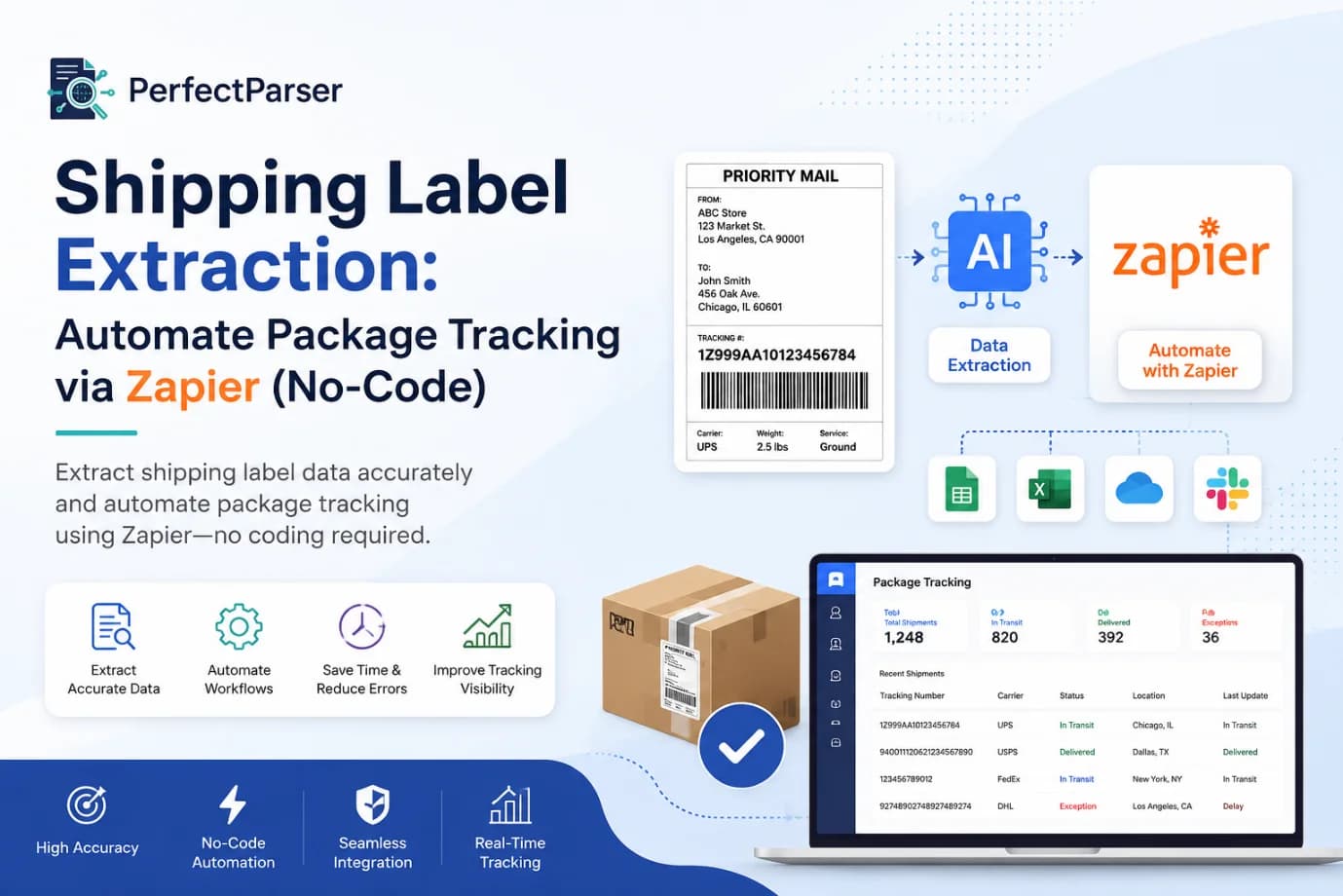
Your fulfillment operation depends on accurate label information. Every single day, team members process shipping documents, carefully noting details, and entering data into various systems. It's repetitive work that demands precision but drains focus and energy from more strategic tasks.
What if this entire process became automatic?
Shipping label extraction revolutionizes how logistics teams operate by transforming manual data work into instant, automated processes. Instead of human data entry, intelligent systems read your labels, capture the information immediately, and deliver it to your business tools without requiring any coding or technical expertise. This guide walks you through implementing this transformation using Zapier shipping automation, the platform trusted by hundreds of thousands of businesses worldwide.
By finishing this article, you'll understand the extraction process, how to set it up efficiently, which tools work best for different scenarios, and how to avoid common pitfalls that derail similar projects.
Why Automated Label Processing Transforms Operations
Automated shipping label data capture eliminates traditional manual workflows where someone must read physical documents, PDF emails, or digital files and type details into systems. This happens dozens, hundreds, or thousands of times daily. The operational impact is significant:
Processing Bottlenecks. Each label requires individual attention. Multiple team members might be handling overlapping shipments, creating potential for inconsistent data capture and workflow delays. When one person is unavailable, processing slows considerably.
Human Error Introduction. Manual data entry inevitably produces mistakes—transposed digits, misread addresses, incomplete information. These errors compound through your systems, affecting inventory accuracy, customer communications, and shipping records.
Fulfillment Cycle Delays. When label data must be manually processed before entry into downstream systems, your shipment timeline extends. Real-time inventory updates become impossible, and customers receive tracking information much later.
Team Resource Drain. Valuable team members spend hours on repetitive data capture instead of problem-solving, customer service, or process optimization. This represents a significant opportunity cost for your operation.
Extract shipping labels automatically and these operational constraints disappear. Processing that required continuous attention now completes in seconds, with perfect consistency and accuracy.
Understanding Shipping Label Components and Data Capture
Before implementing extraction, understanding what information labels contain and how modern systems read them is essential.
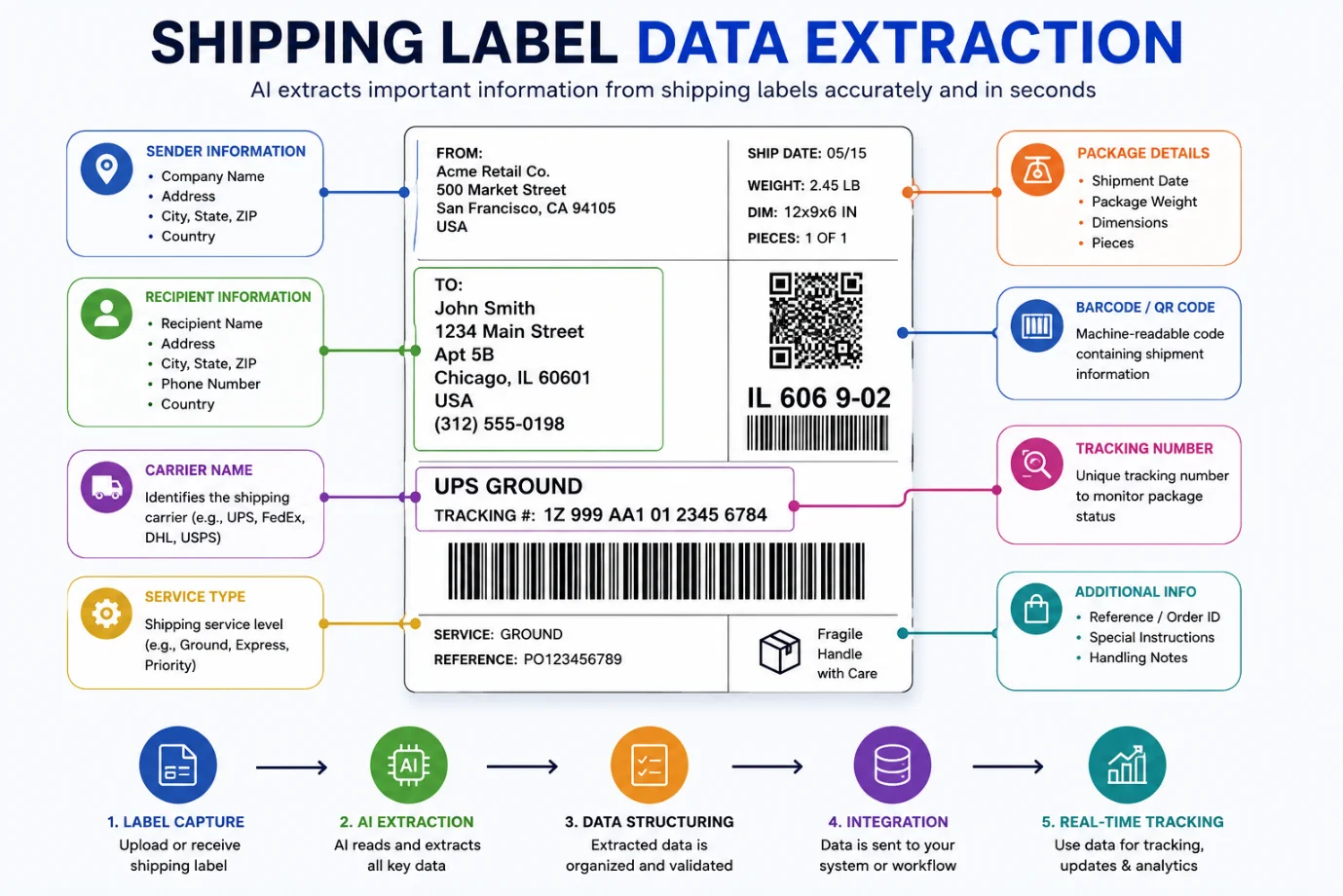
Shipping labels contain structured and sometimes unstructured data:
- Tracking number (unique identifier for shipment reference)
- Carrier designation (USPS, UPS, FedEx, DHL, regional carriers)
- Recipient information (name, address, contact details)
- Package specifications (dimensions, weight, class)
- Service classification (priority level, delivery speed)
- Barcode encoding (machine-readable format)
- Origin information (sender address, company details)
- Special requirements (fragile, signature needed, hold instructions)
- Insurance and value indicators
Modern logistics automation no-code solutions employ several technologies working together:
Optical Character Recognition (OCR) reads text from images and PDFs. Machine learning algorithms understand label layout and context, distinguishing between different label formats and carriers. These technologies work in combination to extract information reliably, even when labels have varying designs.
Zapier shipping automation serves as the connecting bridge, taking extracted data and routing it precisely where your business needs it—inventory systems, customer databases, shipping dashboards, analytics platforms, or team communication channels.
Implementing Shipping Label Extraction: Step-by-Step Process
Setting up Zapier shipping automation follows a logical sequence. Most implementations take between 20-40 minutes depending on your systems' complexity.
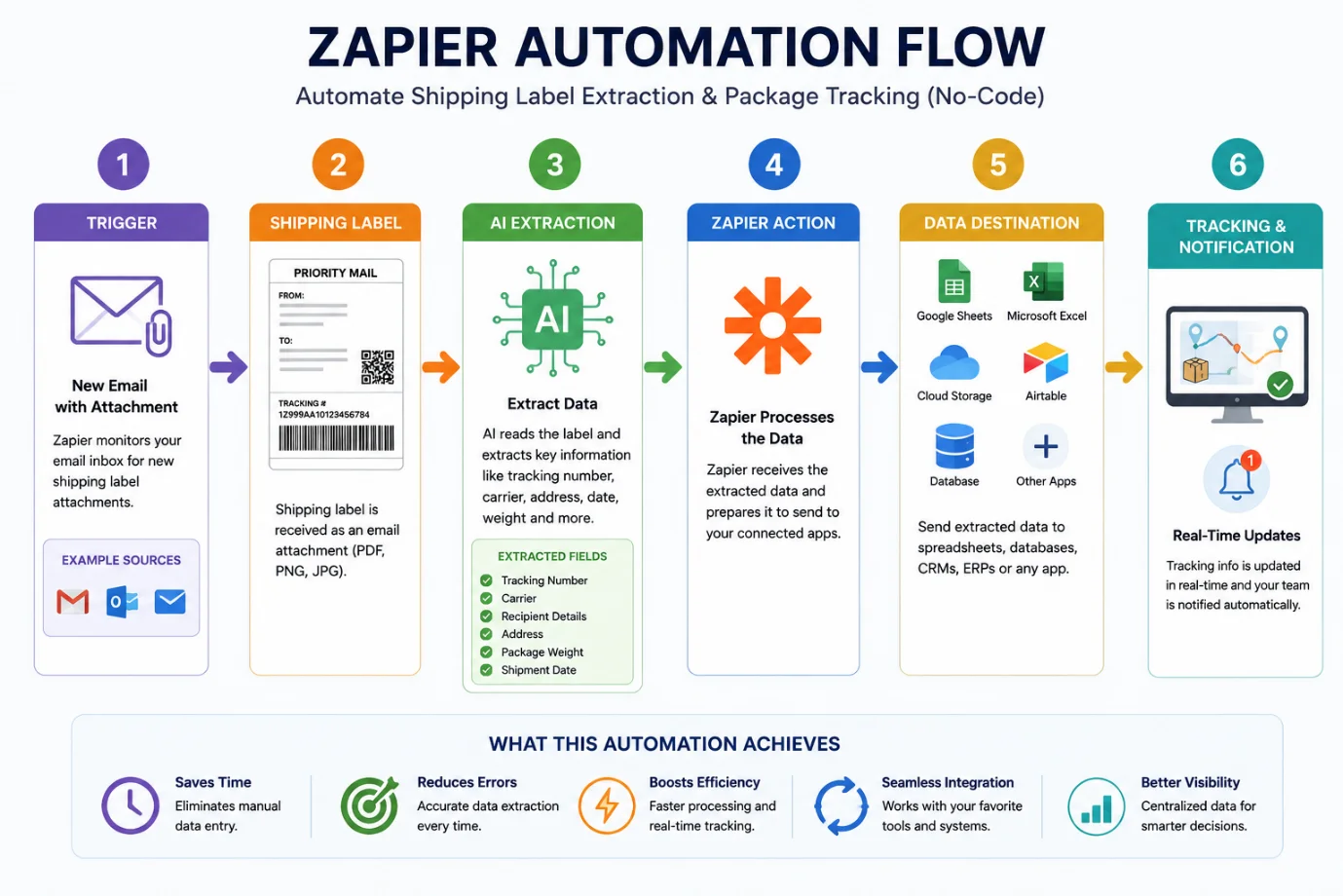
Step 1: Identify Your Label Source
Determine how labels enter your workflow:
- Emailed attachments from shipping software
- Files saved automatically to cloud folders
- Direct feeds from your platform via webhooks
- Manual uploads through web forms
- FTP folder uploads
This determines your workflow trigger. Most small and medium operations receive labels via email, making email the natural starting point.
In Zapier, search your email provider and select the "new attachment" trigger. Configure it to monitor emails from your shipping software's email address. This ensures only relevant shipment labels activate your automation.
Step 2: Configure Data Extraction
When configuring how to extract data from shipping labels, multiple approaches exist depending on your accuracy needs:
Built-In PDF Processing: Zapier includes native text extraction for PDF documents. Use the Formatter tool to extract text, then define which fields you need extracted.
Specialized OCR Services: Third-party services like API.ai, Docparser, and CloudScrape integrate with Zapier and offer superior accuracy for complex or varied label formats. These services understand shipping label structures specifically.
Platform-Native Webhooks: ShipStation, EasyPost, and similar platforms send structured data directly through webhooks. This approach requires no extraction—the data arrives pre-formatted and ready.
Choose based on your label format consistency and accuracy requirements. Consistent formats work fine with Zapier's built-in tools.
Step 3: Structure Extracted Information
Raw extracted data needs organization. Map each data point to defined fields:
- Tracking Number → Inventory System
- Recipient Address → Customer Database
- Weight → Fulfillment Record
- Carrier → Shipping Dashboard
- Service Level → Analytics Platform
Zapier displays this as straightforward field mapping. Select where extracted information originates and where it should go in your destination system.
Step 4: Select Destination System
Choose where processed label information flows:
- Google Sheets - Centralized spreadsheet for team access
- Airtable - Visual database with filtering and views
- Shopify/WooCommerce - Direct order system integration
- Slack - Team notifications and updates
- HubSpot/Salesforce - Customer relationship management
- QuickBooks - Financial and accounting records
- Custom databases - Your internal systems
Most businesses start with a simple destination like Google Sheets, then expand to additional systems over time.
Step 5: Test Before Full Activation
Before going live, run thorough testing:
- Send sample labels through the complete workflow
- Verify data appears correctly in your destination
- Check that all required information is captured
- Test with different label formats if applicable
- Review data accuracy
Address any issues with extraction rules or field mapping. Once you confirm everything works correctly, activate the workflow.
Operational Improvements from Automated Extraction
When properly implemented, no-code package tracking transforms your fulfillment operations:
Speed and Responsiveness
Processing transforms from minutes-per-label to seconds-per-label. A workflow that consumed hours now completes instantly. Your team can respond faster to incoming shipments, prioritize orders more effectively, and maintain faster fulfillment cycles.
Consistency and Reliability
Automated systems capture data identically every time. No variation based on tiredness, distraction, or individual interpretation. Every shipment receives the same treatment and documentation standards, improving overall operation predictability.
Operational Visibility
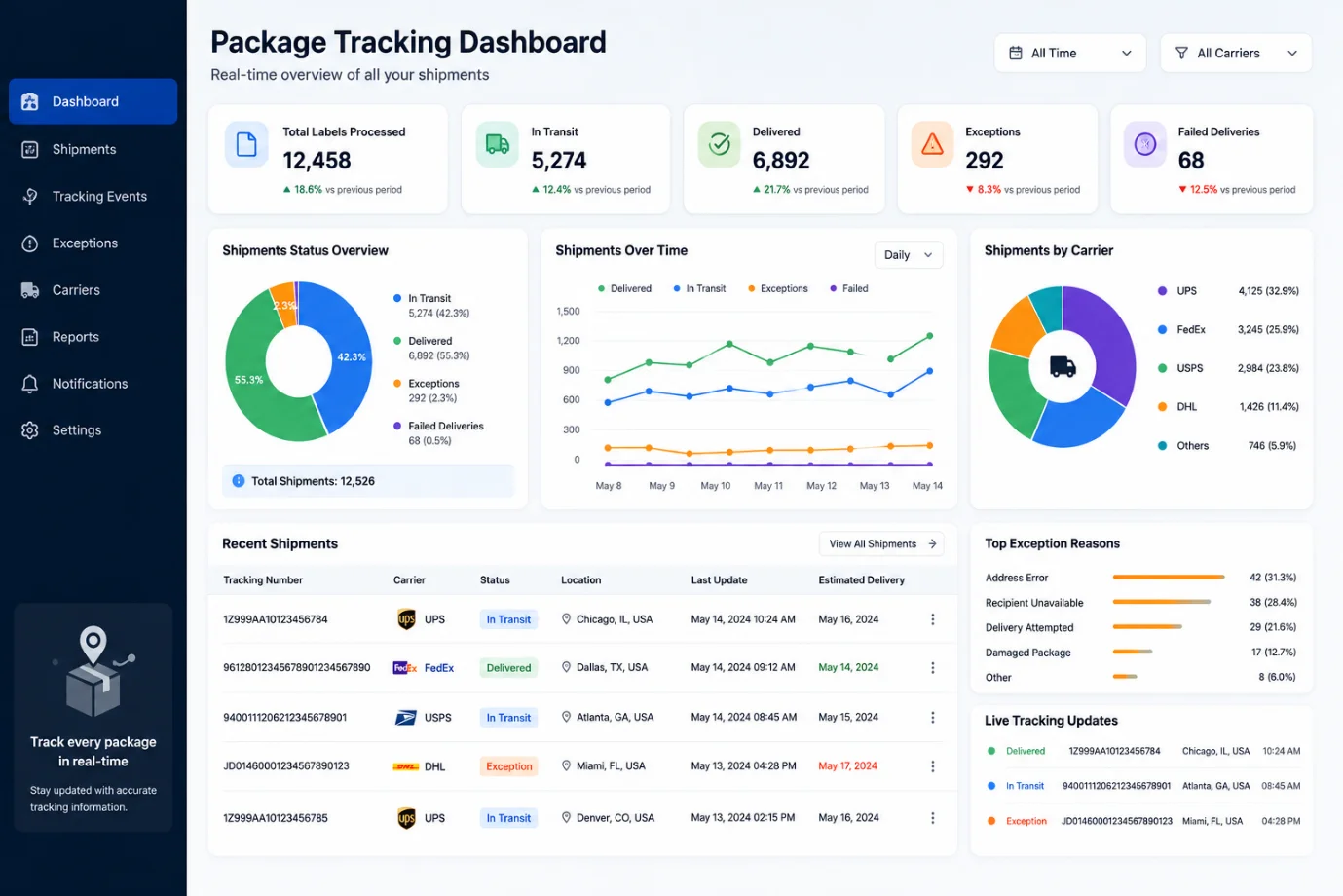
Real-time data flow creates live visibility into your shipping operation. Dashboards update instantly as labels process. Your team sees current status, identifies bottlenecks, and spots issues immediately rather than discovering them later.
Customer Experience Enhancement
Shipping label automation tools enable immediate customer notifications. The moment a label processes, customers receive tracking information. This responsiveness improves customer satisfaction and reduces support inquiries about shipment status.
Scalability Without Expansion
Processing volume increases from 100 to 1000 labels daily without additional workflow complexity. Automated systems scale effortlessly. Your operation grows without operational strain.
Downstream System Integration
Extracted data flows automatically into your ERP, inventory, accounting, and analytics platforms. This creates unified information architecture—no data silos, no duplicate entry, no discrepancies between systems.
Common Implementation Challenges and Solutions
Even with straightforward tools, certain issues recur in extraction projects. Understanding these helps you avoid them:
Challenge 1: Label Format Inconsistency
Different carriers use different label designs. USPS, FedEx, and UPS labels look completely different. Handwritten notes appear on some labels but not others. Without accounting for this variation, extraction quality suffers.
Solution: Work with your shipping team to standardize label templates where possible. If multiple carriers are unavoidable, test extraction with samples from each carrier and adjust rules accordingly. Consider using specialized OCR services better equipped for format variation.
Challenge 2: Incorrect Trigger Configuration
Workflows don't activate if your trigger doesn't match reality. If you configure an email trigger but labels arrive via Dropbox, nothing happens. If you set a Dropbox folder trigger but use Google Drive, extraction never runs.
Solution: Map your actual label flow first. Observe how labels currently enter your system. Configure your trigger to match existing workflows precisely. Avoid changing workflows to match automation; instead, build automation around your current process.
Challenge 3: Over-Engineering Workflows
It's tempting to add multiple processing steps, conditional logic, and numerous integrations. Complex workflows become difficult to troubleshoot and fragile—small changes break unexpected elements.
Solution: Start minimal. Extract three essential data points (tracking number, carrier, recipient). Verify this works flawlessly before adding complexity. Limit initial workflows to 5-7 steps maximum. Add sophistication only after basic functionality proves reliable.
Challenge 4: Missing Validation Layers
OCR occasionally misreads information. Handwriting creates recognition challenges. When flawed data enters your systems unchecked, it corrupts records downstream.
Solution: Build in validation steps. Flag suspicious data—tracking numbers that fail format checks, addresses with missing components, weights outside reasonable ranges. Route flagged items for human review rather than forcing automated processing.
Challenge 5: Insufficient Team Training
Your team still needs understanding of new automation. What triggers it? Where does data go? Without this knowledge, they might disable it, work around it, or misunderstand its capabilities.
Solution: Conduct brief team training sessions. Create simple documentation showing the workflow, what activates it, where output appears. Explain exception handling and manual override processes. Help your team see automation as support rather than threat.
Challenge 6: Absence of Monitoring
You activate automation and assume it works indefinitely. Silently, extraction failure rates creep up. After months, you discover issues that went unnoticed.
Solution: Establish monitoring practices. Review Zapier task histories weekly. Set alerts for failed tasks. Spot-check extracted data monthly. Create simple dashboards showing extraction success rates. Share metrics with your team to maintain engagement.
Best Practices for Successful Implementation
Following these practices maximizes extraction project success:
Prioritize Direct Integrations Over Email
When your shipping platform offers webhook integration with Zapier, use it. Webhooks are faster, more reliable, and more secure than email-based approaches. Data transfers directly between systems rather than through email, improving speed and reducing potential failure points.
Establish Error Notification Systems
Even reliable automation occasionally encounters edge cases. Configure notifications—Slack messages, emails, or dashboard alerts when extraction fails. This prevents silent failures and allows immediate response to problems.
Allow Manual Bypass Capabilities
Automation won't handle every scenario perfectly. Customers might send unusual formats. Special shipments might have custom requirements. Ensure your destination system accepts manual data entry alongside automated feeds. This flexibility prevents frustration when automation limitations are encountered.
Monitor Key Performance Indicators
Track specific metrics:
- Extraction success rate (percentage of labels processed completely)
- Average processing time per label
- Data accuracy through periodic sampling
- Downstream system update timing
These metrics demonstrate value to your team and identify improvement opportunities.
Document Workflow Details
Create simple documentation explaining your automation: what triggers it, which steps process information, where outputs go, how to handle exceptions. This serves as reference material for new team members and troubleshooting during issues.
Review and Adjust Regularly
Your business processes evolve. New carriers are adopted. Label formats change. Shipping volumes fluctuate. Review your automation quarterly to ensure it still matches your operational needs. Update triggers, extraction rules, and destination systems as requirements shift.
Selecting Appropriate Tools for Your Context
Different situations benefit from different shipping label automation tools. Consider your specific environment:
E-Commerce Store Operations
For Shopify or WooCommerce stores, ShipStation with Zapier integration works excellently. ShipStation generates labels automatically, and webhooks send extracted data directly to your store's order system. Implementation is straightforward.
Multi-Carrier Environments
Operations using multiple carriers simultaneously benefit from EasyPost. It provides unified handling for USPS, UPS, FedEx, and others. Zapier integration manages data routing smoothly across carrier variations.
High-Volume Fulfillment Centers
Massive operations benefit from enterprise solutions like Manhattan Associates or Blue Yonder. These handle extraction built-in but involve substantial implementation effort. Smaller operations typically find Zapier plus ShipStation more practical.
Spreadsheet-Dependent Operations
If your operation currently tracks shipments in Google Sheets or Excel, start simply: Email → Zapier PDF Extraction → Google Sheets. This requires minimal setup and provides immediate value.
Specialized Requirements
Unique label formats or industry-specific needs might benefit from Docparser or specialized OCR services. These offer greater customization than general-purpose platforms.
Action Plan: Getting Started with Extraction
Shipping label extraction isn't a nice-to-have—it's an operational necessity for competitive fulfillment. Here's your implementation path:
Step 1: Audit Current Operations
Document how labels currently enter your system. Who processes them? What systems receive the data? Where are the bottlenecks? This baseline shows where automation creates the most impact.
Step 2: Choose Your Starting Platform
For simplicity, begin with Zapier. Your shipping software likely integrates already. If not, Zapier's built-in tools handle most label formats effectively.
Step 3: Build a Single Workflow First
Don't automate everything immediately. Create one workflow extracting essential data from one label type. Verify accuracy and reliability before expanding. (If you also manage incoming inbound shipments alongside outgoing parcels, see our step-by-step guide to connecting packing slip data entry to your WMS via Zapier).
Step 4: Gradually Expand Coverage
Once your first workflow runs smoothly, add additional label types and data fields. Let your team adjust to the new process gradually.
Step 5: Monitor and Refine
Track extraction success rates. Look for patterns in failures. Adjust extraction rules and validation settings based on real-world performance.
Step 6: Train Your Team
Ensure everyone understands the new workflow. Show them what activates extraction, where output appears, and how exceptions are handled.
The entire process, from decision to full operation, typically takes just a few weeks. The sooner you start, the sooner you experience the operational improvements.
Ready to automate your label processing? Create a free Zapier account today. Connect your email and choose your email provider's "new attachment" trigger. Test extraction on your first label. Within minutes, you'll see how much faster this approach works.
Your fulfillment operation will run smoother. Your team will redirect their efforts toward meaningful work. And you'll quickly wonder how you managed without this automation.
Automate Shipping Label Extraction
Extract tracking codes, weight, carrier details, addresses, and barcodes into structured JSON or spreadsheets via no-code workflows.
Explore Shipping Label Solutions →