
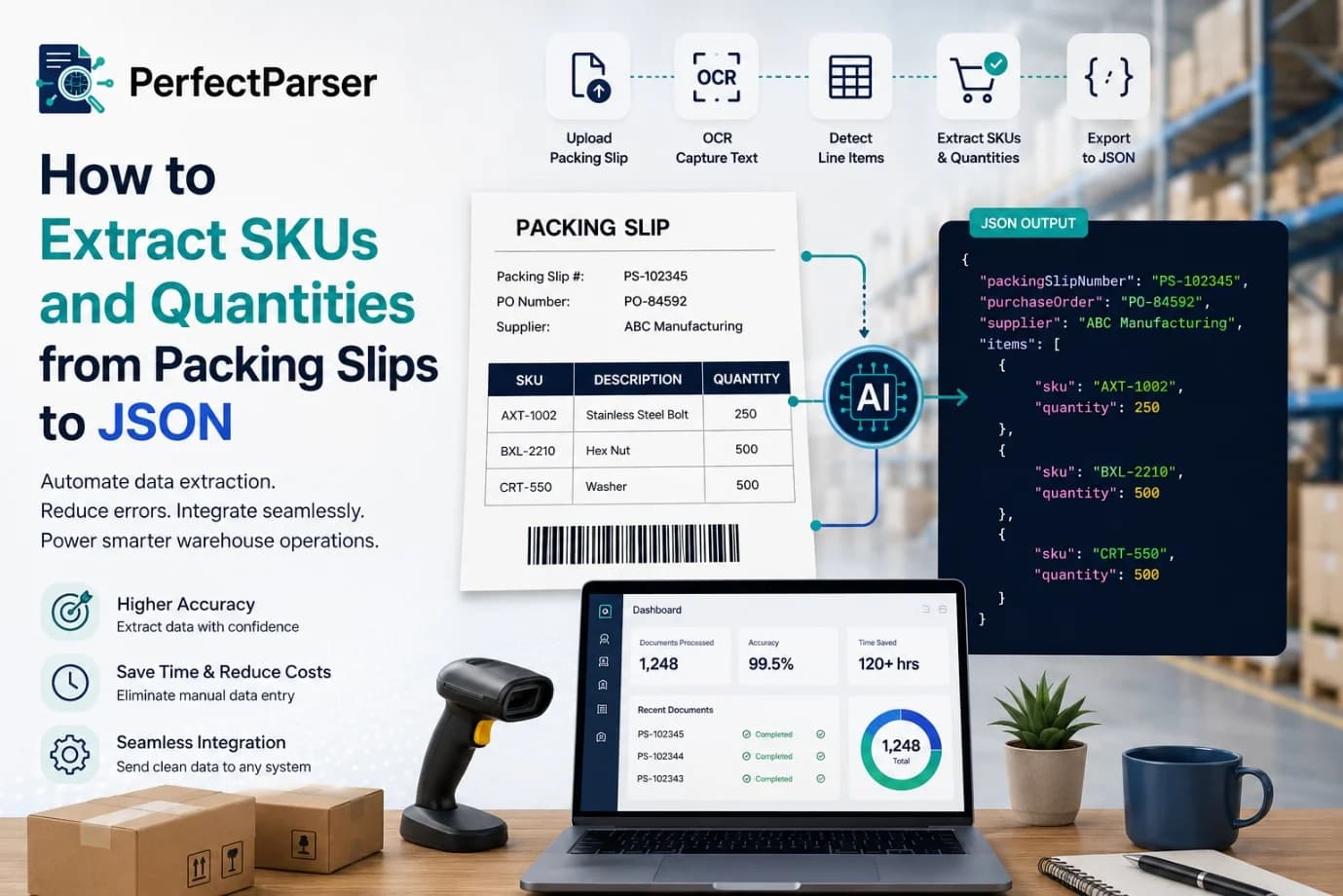
Every shipment that arrives at a warehouse or fulfilment center includes paperwork that keeps inventory moving. Among those documents, the packing slip is one of the most valuable because it lists the products shipped, their identifiers, and the quantities included in the order. While this information is easy for people to read, manually entering it into inventory or ERP systems is slow, repetitive, and prone to errors.
Businesses processing hundreds or thousands of shipments each week often struggle with delays caused by manual data entry. Even a single incorrect SKU or quantity can lead to inventory discrepancies, delayed shipments, customer complaints, or unnecessary operational costs.
Fortunately, modern document processing technologies make it possible to extract SKUs and quantities from packing slips automatically and transform the information into structured JSON that applications can immediately consume.
In this guide, you'll learn how the extraction process works, the challenges involved, best practices for improving accuracy, and why JSON is the preferred format for warehouse automation.
Why Businesses Need Automated Packing Slip Processing
Packing slips contain structured information that connects incoming shipments with purchase orders and inventory records. Although layouts differ between suppliers, most documents include similar information.
Without automation, employees must read each document and manually enter the information into warehouse software. This process becomes increasingly difficult as shipment volume grows.
Manual processing often leads to:
- Typing errors
- Missing products
- Incorrect inventory counts
- Slow receiving operations
- Increased labor costs
Automated extraction significantly reduces these issues while allowing warehouse staff to focus on verification instead of repetitive data entry. If your team is evaluating the cost savings of replacing manual entry, read our automated packing slip extraction ROI analysis.
What Information Should Be Extracted?
Although every organization has unique requirements, most inventory systems require the same core fields from each packing slip.
Typical fields include:
The line-item table is usually the most important section because inventory systems rely on accurate SKU and quantity information.
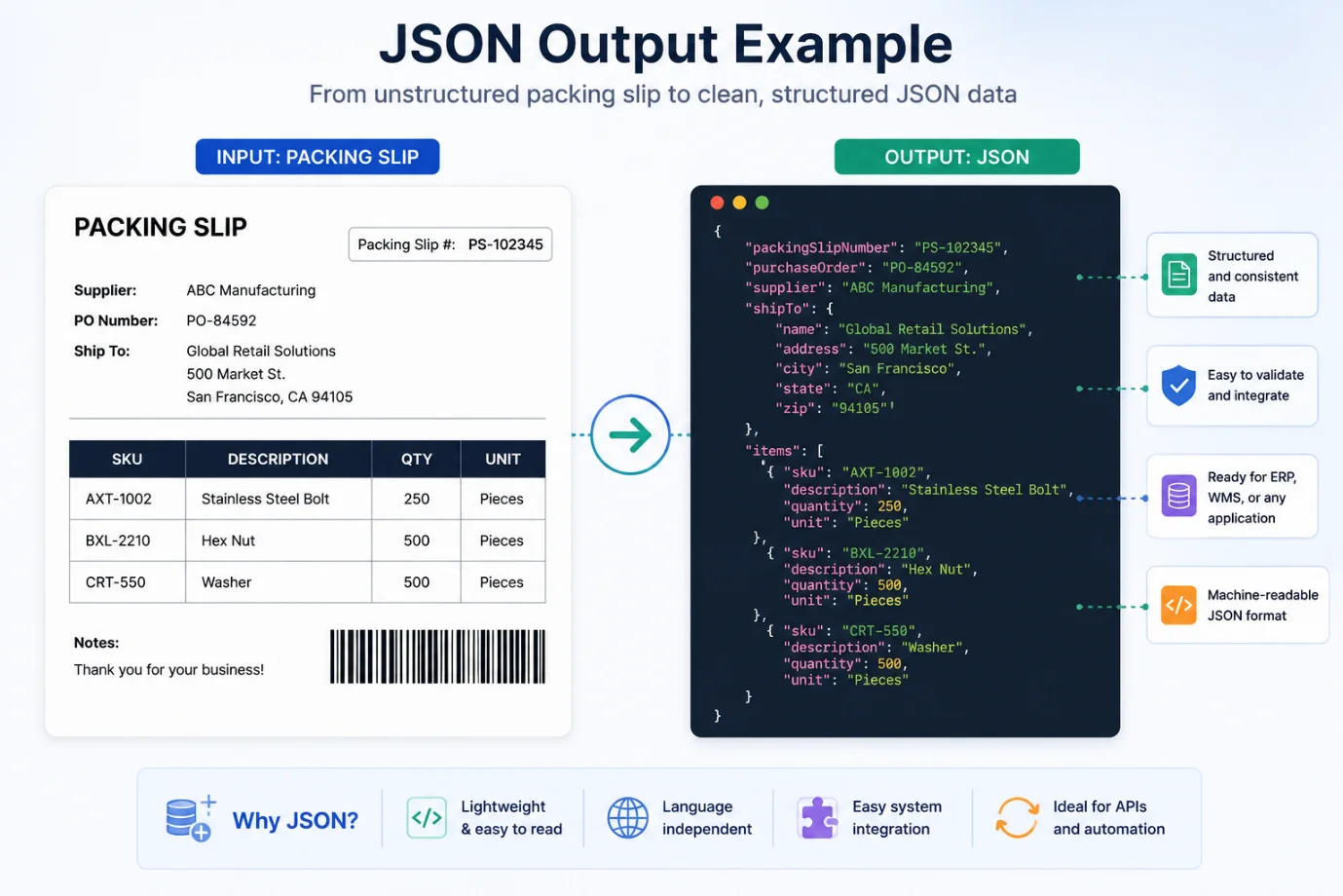
Example packing slip data:
How the Extraction Process Works
Modern document processing follows several stages to convert paper or PDF packing slips into machine-readable information.
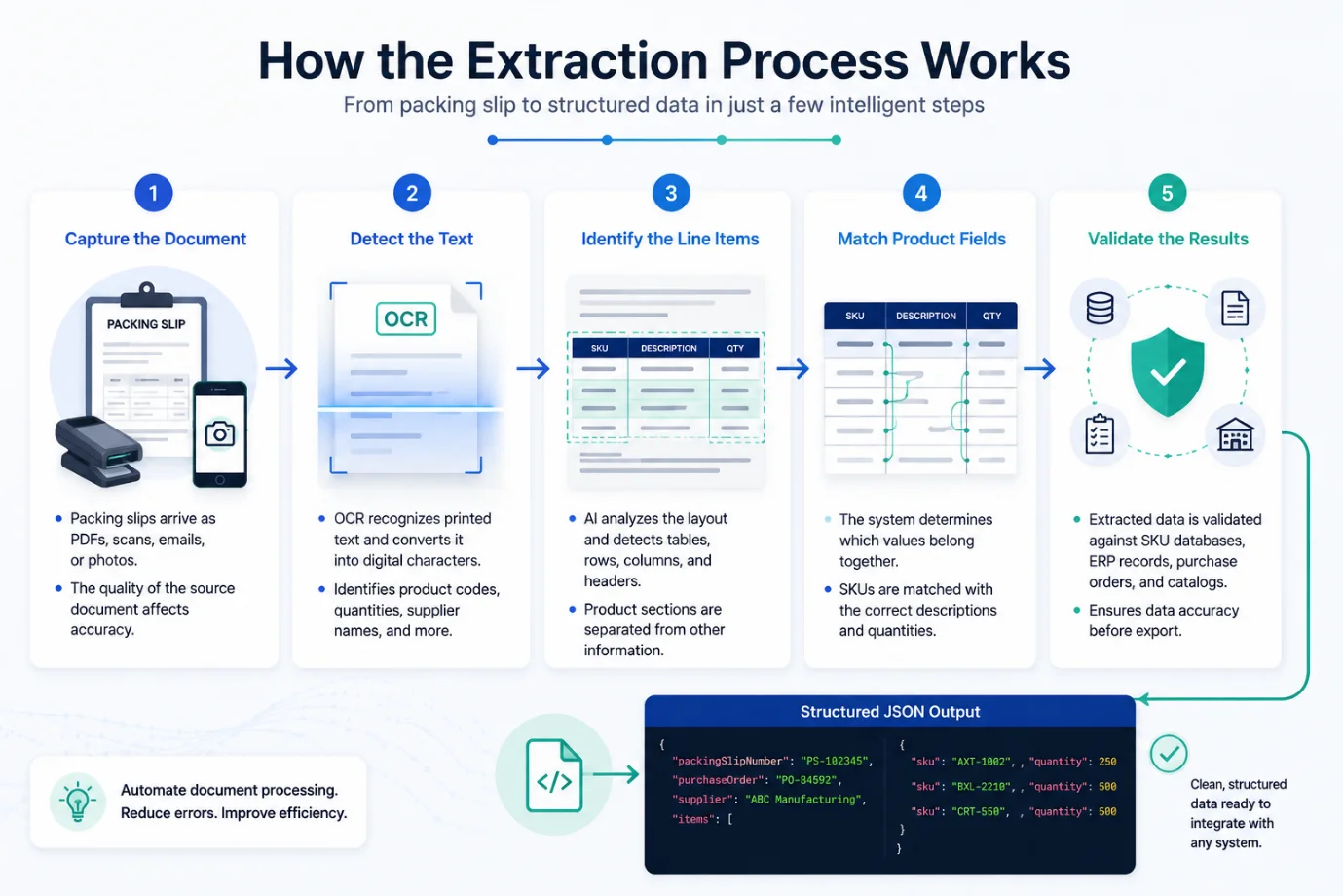
Step 1: Capture the Document
Packing slips may arrive as:
- PDF files
- Scanned documents
- Mobile phone photos
- Email attachments
- Multi-page scans
The quality of the source document directly affects extraction accuracy. When shipments include parcel tags alongside packing lists, see our comparison of barcode scanners vs AI shipping label extraction.
Step 2: Detect the Text
Optical Character Recognition identifies printed text throughout the document and converts it into digital characters.
This stage recognizes:
- Product codes
- Quantities
- Supplier names
- Dates
- Purchase order numbers
OCR creates digital text but does not understand the meaning of each value.
Step 3: Identify the Line Items
Once the text is recognized, intelligent document processing software analyzes the layout.
Instead of simply reading text from top to bottom, it detects:
- Tables
- Rows
- Columns
- Headers
- Product sections
This allows the system to distinguish product information from addresses, notes, or shipping instructions.
Step 4: Match Product Fields
The software determines which values belong together.
Example:
The system links the SKU with its corresponding quantity rather than treating them as unrelated pieces of text.
Step 5: Validate the Results
Before exporting the extracted data, validation checks compare it against:
- Existing SKU databases
- ERP records
- Purchase orders
- Inventory catalogs
These validations help identify unexpected values before they enter production systems.
Common Challenges When Processing Packing Slips
Although packing slips appear straightforward, they vary significantly between suppliers.
Different Layouts
There is no universal packing slip format.
Some vendors use large tables, while others organize products into multiple sections. Fonts, spacing, headers, and column order often differ.
Similar Product Codes
Many suppliers use SKU numbers that differ by only one or two characters.
Examples include:
- AXT1001
- AXT1007
- AXT1011
Even a small recognition error can result in inventory inaccuracies.
Poor Scan Quality
Low-quality scans often introduce problems such as:
- Blurred text
- Cropped pages
- Shadows
- Folded paper
- Uneven lighting
Improving image quality before processing can significantly increase extraction accuracy.
Multi-Page Documents
Large shipments often span multiple pages.
Automation systems must preserve the relationship between line items while avoiding duplicate or missing records.
Handwritten Notes
Warehouse personnel sometimes add handwritten corrections or comments.
Since handwriting recognition is more difficult than printed text recognition, these notes may require manual review.
Best Practices for Improving Accuracy
Organizations that consistently achieve high extraction accuracy typically follow a combination of technical and operational best practices.
Standardize Incoming Documents
Whenever possible, request suppliers to provide:
- High-resolution PDFs
- Digital files
- Consistent layouts
- Clearly formatted tables
Higher-quality input almost always produces better extraction results.
Validate Against Existing Data
Instead of immediately accepting extracted values, compare them with:
- Product catalogs
- Approved supplier lists
- Purchase orders
Validation helps prevent incorrect information from entering inventory systems.
Converting Packing Slip Data into JSON
Once the required information has been extracted, the next step is organizing it into a structured format that business applications can understand. JSON (JavaScript Object Notation) has become the preferred choice because it is lightweight, easy to read, and supported by virtually every modern programming language and enterprise system.
Many organizations use packing slip to JSON workflows to eliminate manual data entry and seamlessly exchange information between warehouse management systems, ERP platforms, accounting software, and inventory applications.
Building an Automated Workflow
A complete document automation workflow involves more than simply reading text from a document. Each stage prepares the data for reliable use across business systems.
A typical workflow includes:
- Receive the packing slip through email, upload, scanner, or API.
- Detect and recognize printed text.
- Identify tables and line items.
- Extract SKU from packing slip records along with associated quantities.
- Validate extracted information against product or ERP databases.
- Generate structured JSON output.
- Send the data to inventory, warehouse, or accounting systems.
Because each step is automated, businesses can process significantly more documents with fewer manual reviews while maintaining consistent data quality.
Real-World Example
Imagine a distribution center that receives shipments from dozens of suppliers every day. Each supplier uses a different packing slip layout, making manual processing slow and error-prone.
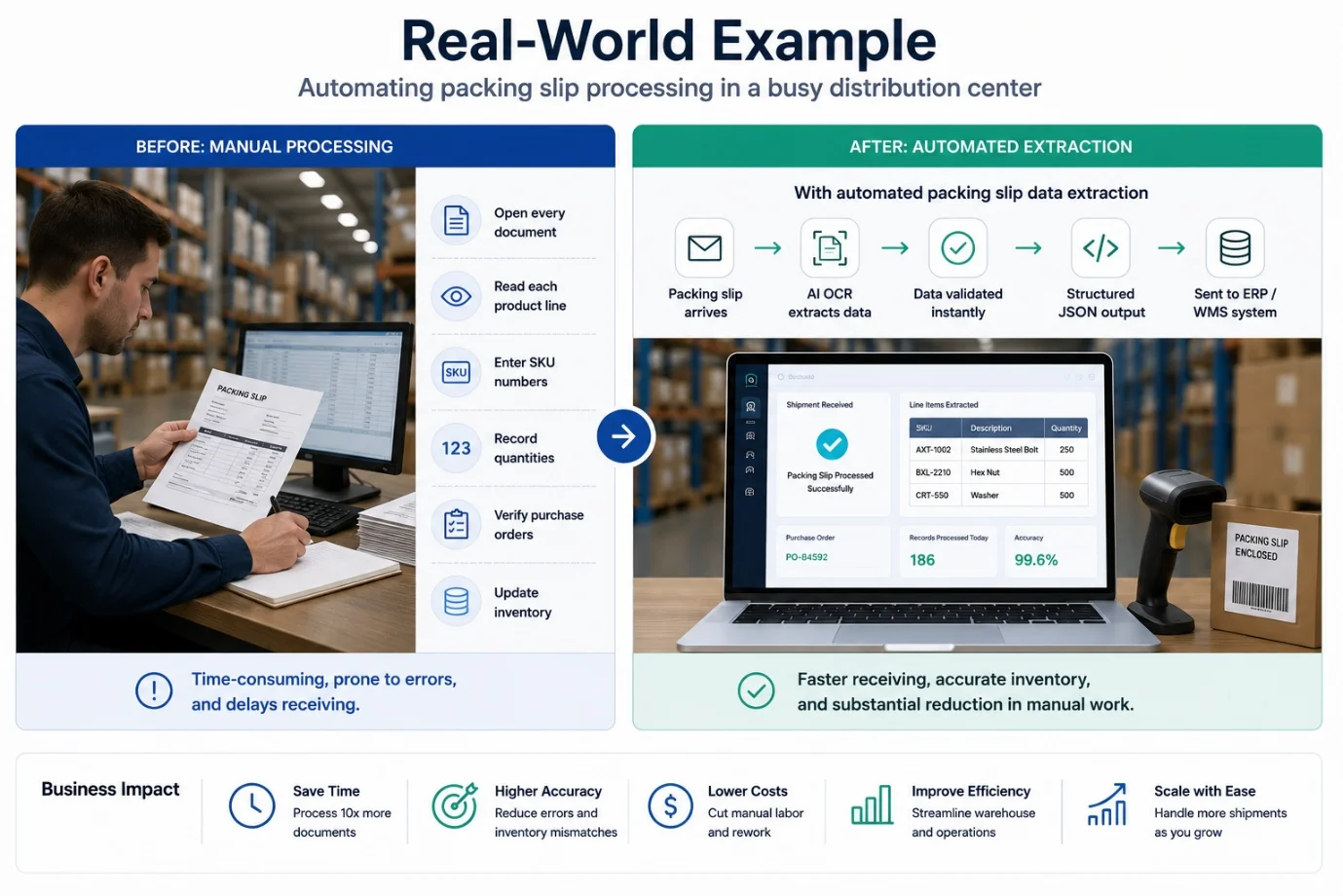
Without automation, warehouse staff must:
- Open every document
- Read each product line
- Enter SKU numbers
- Record quantities
- Verify purchase orders
- Update inventory
Now consider the same process with automated document extraction.
As each packing slip arrives, intelligent software identifies the relevant fields, performs packing slip data extraction, validates product information against the company's inventory database, and exports the results as structured JSON. For a detailed look at how high-volume warehouses handle this, see how 3PLs automate receiving audits with AI packing slip extraction. Employees only review documents that contain missing or uncertain values.
The outcome is faster receiving, more accurate inventory records, and a substantial reduction in manual work.
Why AI Is Improving Document Processing
Traditional OCR software performs well when documents follow predictable layouts. However, real-world packing slips often contain inconsistent formatting, merged columns, varying table structures, and supplier-specific designs.
Modern AI packing slip OCR solutions go beyond recognizing characters. They analyze the document's structure, understand relationships between fields, and identify line items even when layouts differ significantly.
This allows businesses to process documents from multiple vendors without creating custom extraction rules for each template.
Some additional advantages include:
- Better recognition of complex tables
- Higher accuracy across different suppliers
- Improved handling of low-quality scans
- Reduced need for manual template creation
- Greater scalability as document volume increases
Common Mistakes to Avoid
Even the most advanced automation workflow can produce poor results if the source documents or validation process are overlooked.
Here are some of the most common mistakes organizations make.
Ignoring Image Quality
Blurry scans, cropped pages, and poor lighting reduce recognition accuracy before extraction even begins.
Skipping Validation
Automatically accepting extracted data without verification increases the likelihood of incorrect inventory records.
Assuming Every Supplier Uses the Same Format
Packing slips vary widely. Extraction systems should be flexible enough to adapt to different layouts rather than relying on fixed templates.
Overlooking Exception Handling
Not every document can be processed with complete confidence. Low-confidence records should be routed for manual review instead of being imported automatically.
Exporting Inconsistent Data
When businesses convert packing slip to JSON, they should follow a consistent schema so downstream applications receive predictable field names and data structures.
Conclusion
Processing packing slips manually may work for a small number of shipments, but it quickly becomes inefficient as document volumes increase. Automating the extraction of SKU numbers and quantities reduces repetitive work, improves inventory accuracy, and accelerates receiving operations.
By combining OCR, intelligent document processing, validation rules, and structured JSON output, businesses can build reliable workflows that integrate seamlessly with warehouse management systems and ERP platforms. Whether you're handling dozens or thousands of packing slips each day, automation helps transform document-heavy processes into faster, more accurate, and scalable operations.
The key to success is choosing a solution that can adapt to different document layouts, validate extracted data, and deliver consistent output that your business systems can immediately use.
Try PerfectParser Free
Extract data from your first documents today. No credit card required — 20 free credits included.
Start Extracting →